
WebMCP technical guide: APIs and security
Build WebMCP tools with the imperative and declarative APIs. This 2026 guide covers Chrome 149 setup, schemas, security, testing, and safe rollout plans.
Share
WebMCP gives a web page a structured way to tell an AI agent what the page can do. Instead of making the agent reconstruct a task from screenshots, DOM nodes, accessible names, and simulated clicks, the page can register a named tool with a description, a JSON Schema input contract, and a JavaScript function that performs the work.
That sounds simple. The engineering consequences are not.
Inside a live document, a WebMCP tool shares the page's current UI state, authentication cookies, client-side application logic, and origin security model. Registration can appear or disappear as the user navigates. Built-in browser agents, extensions, or author-provided agents in another frame may see it. Tool output can help finish a task or carry hostile text into the agent's next reasoning step.
This guide covers the whole surface as it exists on July 12, 2026. It explains the current Chrome implementation, the evolving W3C draft, both authoring APIs, cross-origin behavior, schema and result design, security boundaries, testing, observability, and progressive enhancement. It also marks unresolved parts of the proposal so you can experiment without building product assumptions on draft behavior.
Key takeaways
- Chrome offers WebMCP through an origin trial starting in Chrome 149 and a local testing flag.
- The imperative API registers JavaScript tools; the declarative API compiles annotated HTML forms into tools.
- WebMCP complements browser automation and backend MCP. It does not replace either one.
- Production-grade tools still need server authorization, validation, confirmation, idempotency, audit logs, and prompt-injection defenses.
In this guide
- WebMCP definition and 2026 implementation status
- Runtime architecture and interface selection
- Chrome setup and tool strategy
- Imperative API implementation
- Registration lifecycle and JSON Schema design
- Results, discovery, and execution
- Declarative forms and submission
- Iframe permissions and cross-origin exposure
- Threat model and safe transaction patterns
- Browser fallback, testing, and observability
- Rollout stages, mistakes, and implementation checklist
What is WebMCP, exactly?
The current W3C WebMCP draft, retrieved July 12, 2026, defines a secure-context API under document.modelContext. A page registers client-side functions as tools. An authorized agent discovers those tools, chooses one, sends structured arguments, and receives the function's result. A second, declarative API turns ordinary HTML forms into tool contracts.
WebMCP is designed for cooperative work inside a visible browser context. The page remains open. The user can see the interface, review changes, and take over. The tool reuses the web application's existing JavaScript and authenticated browser state rather than requiring a separate server integration for every client-side task.
Its name can cause confusion. WebMCP borrows tool vocabulary and schema ideas from the Model Context Protocol, but it is not a browser transport for a remote MCP server. This web-platform proposal has document lifetime, origin rules, Permissions Policy, DOM integration, and page-visible execution.
The proposal's README describes four goals that explain the design:
- keep a human in the loop
- make browser agents more reliable than click-by-click actuation
- preserve the web application's interface and context
- reuse client-side code instead of recreating it behind a separate integration
Its non-goals are equally useful. WebMCP is not primarily designed for headless browsing, unattended autonomous workflows, replacing backend integrations, or replacing human interfaces.
That scope gives WebMCP a clear job: it is an in-page actuation contract for agents working with a user in a live browser.
What is the implementation status in July 2026?
Chrome's WebMCP overview, retrieved July 12, 2026, says the origin trial begins with Chrome 149. Local development is available through chrome://flags/#enable-webmcp-testing. The API remains experimental, the draft is under active discussion, and several important areas are unresolved.
There are three versions to keep separate in your documentation:
| Surface | Current status | What developers should assume |
|---|---|---|
| Chrome implementation | Origin trial from Chrome 149 | Available for controlled testing, not universal production support |
| W3C WebMCP draft | Community draft under active development | API shapes can change before standardization |
| Other browsers and agents | No general interoperability guarantee | Always preserve a non-WebMCP path |
Chrome's imperative guide also notes that navigator.modelContext is deprecated in Chrome 150. New code should use document.modelContext. Older experiments and compatibility libraries may still mention the navigator form, but it should not be the primary API in a 2026 implementation.
Several draft areas remain open:
- output schemas
- cross-document responses after navigation
- native user prompting and elicitation
- long-running progress updates
- streaming or transferable inputs and outputs
- multimodal tool data
- background discovery through service workers
- final algorithms for compiling every form control into JSON Schema
These are not small details. If your design depends on a settled outputSchema, background execution, or a standardized confirmation dialog, it is ahead of the current specification.
WebMCP is usable for experiments in Chrome 149, but it is not a finished cross-browser standard. Build it as progressive enhancement, keep browser and API fallbacks, and isolate draft-specific code behind a small integration layer.
How does the WebMCP runtime model work?
A WebMCP call has five operational stages: registration, discovery, selection, execution, and response. The browser mediates the boundary between the document that owns a tool and the agent that wants to invoke it.
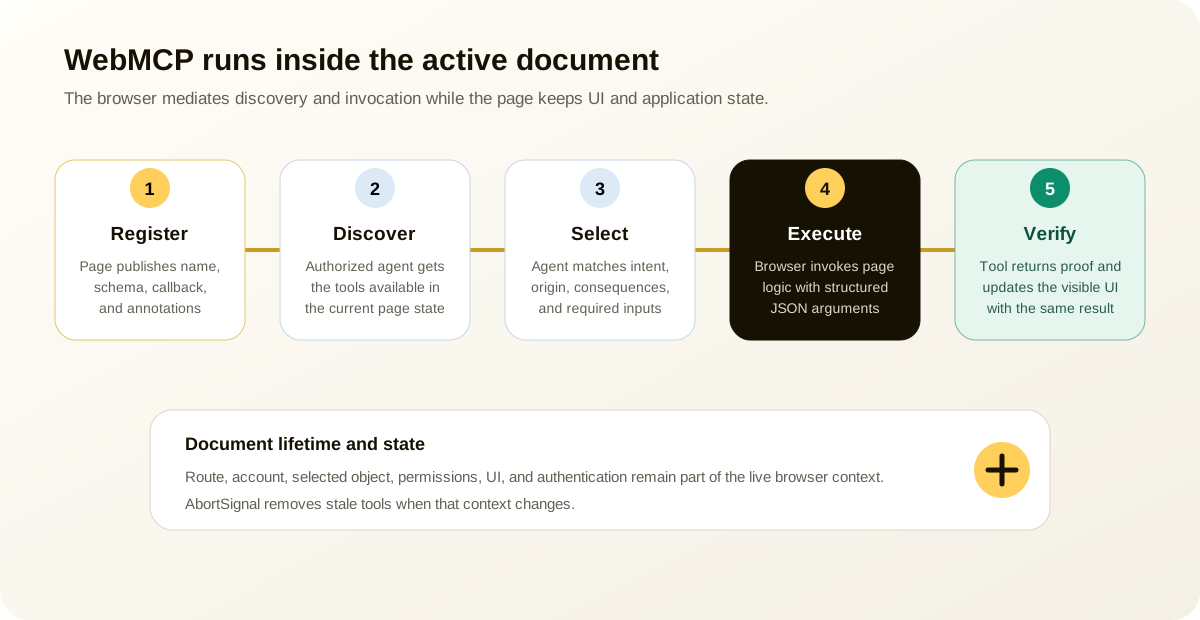
- The active document registers a tool with
document.modelContext.registerTool()or exposes an annotated form. - A browser agent or authorized in-page client gets the available tool list.
- The agent compares the user's request with tool names, descriptions, schemas, annotations, current origin, and visible page state.
- The browser invokes the selected tool with JSON arguments.
- The tool reuses page logic, updates the interface where appropriate, and returns a serializable result.
Page state belongs to the runtime rather than a passive description file. A tool can depend on the selected account, open project, active document, cart, or patch under review. State changes let the page unregister an obsolete tool and publish the action that now applies.
This is the key difference from static discovery metadata. A manifest can describe an action, but it cannot hold an execute callback or track the current tab's UI state. The WebMCP proposal considered static manifests and left room for them as a later layer, but the present design centers live document registration.
Tool registration is tied to the document lifetime. The WebMCP security questionnaire says tools are not persisted across browsing sessions. A document in the back-forward cache may retain registrations in memory, but its tools should be unavailable while that document is not fully active. When a document disconnects, its tools stop being discoverable and pending calls should fail.
That lifecycle prevents stale page code from acting after its context is gone. Your application still has to remove tools when their business state becomes invalid.
Which interface should you choose for an agent action?
These interfaces overlap, but they are not interchangeable. Pick based on runtime location, discovery model, user visibility, and the task's risk.
| Dimension | Browser automation | WebMCP | Backend MCP | OpenAPI |
|---|---|---|---|---|
| Runtime | Controlled browser | Active page document | Remote or local server | HTTP server |
| Primary contract | Visible UI and browser semantics | Registered page tools | MCP tools, resources, prompts | HTTP operations and schemas |
| Current page state | Observed indirectly | Available directly to page code | Must be synchronized | Must be represented in API state |
| Authentication | Browser session | Browser session plus server checks | Protocol-specific credentials | HTTP authentication |
| User visibility | Operates visible UI | Designed for visible browser collaboration | Often outside the page | Usually outside the page |
| Coverage | Broad fallback across existing sites | Only participating pages and clients | Configured integrations | Published and authorized APIs |
| Best fit | Legacy and cross-site workflows | Cooperative in-page actions | Stable service integrations | Conventional service APIs |
Browser automation remains the compatibility floor. In CanAgentUse's June 2026 review of 8 agent systems, all systems with sufficient public detail used or described screenshots, accessibility snapshots, DOM mappings, CDP, browser control, or configured tools. The same review found no confirmed ordinary-browsing case of a general agent consuming a target site's WebMCP surface. WebMCP was new, so that result is a maturity snapshot rather than a verdict.
Backend MCP is better when the action should work without a visible page, across many clients, or through a stable service boundary. OpenAPI is better when the product already has a conventional HTTP API and wants broad tooling support. WebMCP is strongest when the current page state and user-visible interface are assets rather than incidental details.
Unique Insight
A mature product may expose all four paths:
- semantic HTML for people, accessibility technology, tests, and browser agents
- WebMCP for efficient actions inside the live page
- OpenAPI for conventional programmatic access
- MCP for configured agent integrations and richer tool orchestration
All four contracts should share server-side policy and validation. Inconsistent business-rule implementations are worse than one browser-only path.
How do you enable WebMCP for local development?
Chrome documents a local testing flag and a Chrome 149 origin trial. Start with the flag so you can test on localhost without treating experimental support as a production dependency.
Enable the Chrome flag
- Open Chrome 149 or later.
- Navigate to
chrome://flags/#enable-webmcp-testing. - Set the flag to
Enabled. - Relaunch Chrome.
- Open your application in a secure or locally trusted context.
Then verify the API before registering anything:
JavaScript// webmcp-capability.js
export function getWebMcpSupport() {
return {
available: "modelContext" in document,
registerTool:
typeof document.modelContext?.registerTool === "function",
getTools:
typeof document.modelContext?.getTools === "function",
executeTool:
typeof document.modelContext?.executeTool === "function",
};
}
console.table(getWebMcpSupport());
Do not throw when WebMCP is unavailable. The page should remain fully usable through its normal controls.
Check origin isolation
Chrome requires an origin-isolated document. The overview warns that WebMCP is disabled when document.domain relaxation is enabled, including deployments that opt out of origin-keyed agent clusters with Origin-Agent-Cluster: ?0.
Inspect your response headers and any legacy document.domain code. A modern application should avoid cross-subdomain identity tricks and use explicit messaging or server APIs instead.
Join the origin trial carefully
An origin trial enables testing for real users on registered origins. Treat it like a controlled product experiment:
- restrict enrollment to staging or a small production cohort
- log client capability and API version assumptions
- gate every tool behind normal server authorization
- retain browser fallback
- document the feature as experimental
An origin trial can show whether the API helps your application. It cannot guarantee that the final standard will preserve every method or event name.
How should you choose the first WebMCP tools?
Chrome's May 2026 WebMCP best practices, retrieved July 12, 2026, recommends a tool strategy before implementation. Each tool should have one clear function, avoid overlap, appear only when useful, and ask the model to do as little transformation work as possible.
A good first tool has five properties:
| Property | Why it matters | Example |
|---|---|---|
| Narrow purpose | Easier selection and permission review | search_orders |
| Clear state boundary | Avoids acting on stale context | Current account and date range |
| Low or reviewable risk | Safe early rollout | Prepare a return, do not finalize it |
| Structured result | Gives the agent proof and next actions | Matching orders plus stable IDs |
| Existing shared logic | Prevents policy drift | Reuse the same service as the visible UI |
Avoid a broad tool called manage-account, finalize-cart, or do-action. The draft specification's security section uses ambiguous finalization as a risk example because an agent cannot know whether "finalize" means review or purchase.
Prefer explicit verbs:
get_order_statusreads dataprepare_return_requestcreates a reviewable draftsubmit_return_requestperforms a state change after confirmationdelete_saved_addressclearly signals a destructive consequence
Tool count matters even though the API has no stated maximum. Every tool consumes model context and increases selection ambiguity. Ten precise, state-aware tools can outperform a catalog of one hundred overlapping actions.
Registration should also follow page state. A submit_return_request tool should not exist before an eligible order is selected. A publish_document tool should disappear when the viewer lacks permission. A read-only search tool may remain registered across several views.
How do you register a production-style imperative tool?
The imperative API accepts a ModelContextTool object and optional registration settings. The current draft includes name, optional title, description, optional inputSchema, execute, and annotations. Registration options include an AbortSignal and exposedTo origins.
The following example registers a read-only order search tool and keeps UI state synchronized:
JavaScript// webmcp/order-tools.js
export async function registerOrderSearchTool({ accountId, api, ui }) {
if (!document.modelContext?.registerTool) return () => {};
const controller = new AbortController();
const tool = {
name: "search_orders",
title: "Search orders",
description:
"Find orders in the active account by date range and optional status. " +
"Returns order identifiers, dates, totals, and shipping status.",
inputSchema: {
type: "object",
additionalProperties: false,
properties: {
placedAfter: {
type: "string",
format: "date",
description: "Earliest order date, formatted as YYYY-MM-DD.",
},
placedBefore: {
type: "string",
format: "date",
description: "Latest order date, formatted as YYYY-MM-DD.",
},
status: {
type: "string",
enum: ["processing", "shipped", "delivered", "cancelled"],
description: "Optional order status filter.",
},
limit: {
type: "integer",
minimum: 1,
maximum: 20,
default: 10,
description: "Maximum number of orders to return, from 1 to 20.",
},
},
required: ["placedAfter", "placedBefore"],
},
annotations: {
readOnlyHint: true,
untrustedContentHint: false,
},
async execute(input) {
const query = validateOrderSearch(input);
const response = await api.searchOrders({
accountId,
...query,
});
if (!response.ok) {
throw new Error(normalizeOrderSearchError(response));
}
const result = {
accountId,
matched: response.orders.length,
orders: response.orders.map((order) => ({
id: order.id,
placedAt: order.placedAt,
total: order.total,
currency: order.currency,
status: order.status,
detailsUrl: `/account/orders/${encodeURIComponent(order.id)}`,
})),
};
ui.showOrderSearchResults(result.orders);
ui.announce(`${result.matched} matching orders found.`);
return result;
},
};
await document.modelContext.registerTool(tool, {
signal: controller.signal,
});
return () => controller.abort("Order search tool is no longer available.");
}
function validateOrderSearch(input) {
if (!input || typeof input !== "object") {
throw new Error("Search parameters must be an object.");
}
const placedAfter = String(input.placedAfter || "");
const placedBefore = String(input.placedBefore || "");
const limit = Number(input.limit || 10);
const datePattern = /^\d{4}-\d{2}-\d{2}$/;
if (!datePattern.test(placedAfter) || !datePattern.test(placedBefore)) {
throw new Error("placedAfter and placedBefore must use YYYY-MM-DD.");
}
if (!Number.isInteger(limit) || limit < 1 || limit > 20) {
throw new Error("limit must be an integer from 1 to 20.");
}
const allowedStatuses = new Set([
"processing",
"shipped",
"delivered",
"cancelled",
]);
const status = input.status ? String(input.status) : undefined;
if (status && !allowedStatuses.has(status)) {
throw new Error("status is not supported.");
}
return { placedAfter, placedBefore, limit, status };
}
function normalizeOrderSearchError(response) {
if (response.status === 401) return "Sign in before searching orders.";
if (response.status === 403) return "This account cannot search these orders.";
if (response.status === 429) return "Order search is busy. Retry after 30 seconds.";
return "Order search failed without changing account state.";
}
This example does several things the schema alone cannot guarantee. It validates again in code, scopes the search to the active account on the server call, normalizes errors, limits output, updates the visible page, and returns stable identifiers. The agent can continue through the UI or another tool without guessing whether the search completed.
Understand the registration errors
The W3C draft describes specific registration failures:
| Error | Typical cause |
|---|---|
InvalidStateError | Inactive document, duplicate tool name, or invalid empty/name constraints |
NotAllowedError | The tools Permissions Policy blocks registration |
SecurityError | Origin isolation fails or exposedTo contains an untrustworthy origin |
TypeError or serialization error | The input schema cannot be serialized |
Tool names are limited to 1 through 128 characters and may contain ASCII letters, digits, underscore, hyphen, and period. Chrome's security guidance recommends a much smaller operational budget of about 30 characters for tool and parameter names.
Catch registration errors at the integration boundary. Do not let an experimental tool prevent the normal application from rendering.
CanAgentUse implementation note: registering create_scan
Personal Experience
CanAgentUse now registers its public create_scan tool through document.modelContext, the current API described in this guide. The root layout checks for support, awaits registration safely, validates HTTP or HTTPS input, calls the same /api/scans endpoint used by the product, rejects unsuccessful responses, and returns a structured creation result.
This is a deliberately narrow first tool. It accepts one public website URL and creates one scan. The server still applies rate limits, URL validation, scan policy, and response shaping. Browsers without WebMCP continue to use the normal scan interface or the public API, so removing the tool would not remove the product capability.
The implementation also exposed a subtle migration bug during this review. The live bootstrap still referenced navigator.modelContext, even though Chrome 150 deprecates that path. Updating the guide without updating the page would have made the article technically correct and the product inconsistent. The production build now uses document.modelContext and catches asynchronous registration failures.
That is a useful release rule: test the page hosting a technical guide against the same advice the guide gives. Documentation should fail review when its live example contradicts the recommended API.
Reproduce the CanAgentUse registration check
You can inspect the same implementation without a private build or test account. Enable WebMCP testing in a supported Chrome build, open any public CanAgentUse page, and inspect the registered tools. The catalog should contain create_scan with one required url property, additionalProperties: false, and readOnlyHint: false.
Next, view the rendered page source and search for modelContext. The executable bootstrap should bind document.modelContext; navigator.modelContext should appear only in this article's deprecation explanation. Disable the WebMCP flag and reload once more. The normal scan form must still work because the registration is an enhancement, not a startup dependency.
How should tool registration follow application state?
An SPA can keep a document alive while users move across projects, accounts, and authorization states. A tool registered at startup may become dangerously stale. The AbortSignal registration option gives your component or route a clean unregistration mechanism.
For a framework-neutral registry:
JavaScript// webmcp/tool-registry.js
export class WebMcpToolRegistry {
#controllers = new Map();
async add(tool, options = {}) {
if (!document.modelContext?.registerTool) return false;
if (this.#controllers.has(tool.name)) {
throw new Error(`Tool already managed: ${tool.name}`);
}
const controller = new AbortController();
this.#controllers.set(tool.name, controller);
try {
await document.modelContext.registerTool(tool, {
...options,
signal: controller.signal,
});
return true;
} catch (error) {
this.#controllers.delete(tool.name);
throw error;
}
}
remove(name, reason = "Tool state changed") {
const controller = this.#controllers.get(name);
if (!controller) return;
controller.abort(reason);
this.#controllers.delete(name);
}
clear(reason = "Page context changed") {
for (const [name, controller] of this.#controllers) {
controller.abort(reason);
this.#controllers.delete(name);
}
}
}
Use the registry at real business-state transitions. Clear or replace tools when the account or permission changes, when a selected record is no longer active, or when the user signs out. Closing an editor, finishing a destructive action, and unmounting the owning route may also invalidate the callback's assumptions.
Static registration is still the best default for stable, broadly available tools. Dynamic registration should reflect a real availability boundary, not decorate every minor UI state. Otherwise the tool list churns and agents spend time reevaluating it.
Authorized frames can listen for the toolchange event on document.modelContext. The specification warns that its task-source timing should not be compared with arbitrary timers. Treat the event as an invalidation signal and fetch the current tool list again.
How do you design an input schema an agent can use?
WebMCP uses JSON Schema vocabulary for imperative inputs. The schema guides the agent, but current design discussions do not justify treating native schema enforcement as your only validator. Chrome's best-practices page puts it plainly: validate strictly in code and loosely in schema.
Use schemas to reduce decision work:
- Set
type: "object"at the root. - Disable unknown fields with
additionalProperties: falsewhere clients support it. - Use
enumfor closed business choices. - Describe units, formats, and consequences.
- Mark only genuinely required properties.
- Put hard authorization and business constraints in server code.
Prefer user-level values over internal IDs
An agent should pass shippingSpeed: "express", not shippingRateId: 17, unless the ID came from a trusted prior tool response. The first value carries meaning. The second requires hidden product knowledge.
Accept raw user intent where possible
Chrome recommends avoiding unnecessary model-side calculation. If a scheduling function can parse "11:00 to 15:00," accept that range instead of requiring the model to calculate a duration. Let deterministic application code normalize it and return the interpreted values for review.
Keep privacy requirements minimal
The WebMCP draft identifies over-parameterization as a privacy risk. A dress search might need size and price. It probably does not need age, pregnancy status, location, skin tone, height, and purchase history. An agent may helpfully fill those fields from cross-site context, leaking information the user never meant to share.
For every parameter, ask:
- Is it required to perform this action?
- Can the page derive it from current same-origin state?
- Would a person expect to share it here?
- Is the description asking the agent to infer sensitive data?
- Can the user inspect the value before it leaves the browser?
Minimal schemas improve selection, privacy, and completion speed at the same time.
What should result and error contracts contain?
Return the smallest structured result that proves what happened and supports the next decision. A friendly sentence is fine for display, but a production result usually needs stable machine fields.
For a read operation:
JSON{
"status": "ok",
"matched": 2,
"orders": [
{
"id": "ord_4821",
"status": "shipped",
"detailsUrl": "/account/orders/ord_4821"
}
]
}
For a prepared but uncommitted action:
JSON{
"status": "review_required",
"draftId": "ret_draft_901",
"expiresAt": "2026-07-12T12:30:00Z",
"summary": {
"orderId": "ord_4821",
"items": 1,
"estimatedRefund": "49.00",
"currency": "USD"
},
"reviewUrl": "/account/returns/ret_draft_901/review"
}
For a completed write:
JSON{
"status": "completed",
"returnId": "ret_731",
"createdAt": "2026-07-12T12:07:31Z",
"receiptUrl": "/account/returns/ret_731"
}
Output schemas remain an open question in the W3C draft, so do not document outputSchema as a settled production feature. Applications can still version and validate return objects internally. Shared TypeScript types and runtime validators will make later adoption easier if a standard output contract lands.
Chrome's July 2026 secure-tools guidance recommends keeping individual tool output near 1,500 characters while the ecosystem matures. That is operational guidance, not a normative WebMCP limit. Return IDs and summaries, then let the agent request detail through another bounded tool or navigate to the visible page.
Errors should be actionable and honest:
JSON{
"status": "error",
"code": "RETURN_WINDOW_CLOSED",
"message": "This order was delivered 46 days ago. Returns close after 30 days.",
"recoverable": false
}
Never return "Something went wrong" when the application knows what failed. Also avoid leaking stack traces, database keys, internal policy rules, or sensitive authorization details.
How do author-provided agents discover and execute tools?
Chrome's current imperative documentation exposes document.modelContext.getTools() and executeTool() for authorized in-page clients. These methods are especially relevant to a chat agent embedded in the application or an agent hosted in an allowed frame.
Same-origin discovery:
JavaScriptconst tools = await document.modelContext.getTools();
for (const tool of tools) {
console.log({
name: tool.name,
description: tool.description,
origin: tool.origin,
annotations: tool.annotations,
});
}
Manual execution takes a discovered tool and a JSON string:
JavaScriptconst orderSearch = tools.find((tool) => tool.name === "search_orders");
if (!orderSearch) {
throw new Error("search_orders is unavailable in the current page state.");
}
const result = await document.modelContext.executeTool(
orderSearch,
JSON.stringify({
placedAfter: "2026-06-01",
placedBefore: "2026-07-12",
status: "shipped",
limit: 10,
})
);
console.log(result);
Execution can accept an AbortSignal in Chrome's current API:
JavaScriptconst controller = new AbortController();
const pending = document.modelContext.executeTool(
orderSearch,
JSON.stringify({
placedAfter: "2026-06-01",
placedBefore: "2026-07-12",
}),
{ signal: controller.signal }
);
document.querySelector("#cancel-agent-task")?.addEventListener("click", () => {
controller.abort("The user cancelled the task.");
});
const result = await pending;
Do not expose getTools() output directly to a remote model without filtering and policy. Tool metadata is untrusted page content from the agent provider's perspective. An author-provided agent should enforce origin allowlists, minimize tool context, label untrusted output, and require confirmation based on actual consequences rather than trusting the tool's self-description.
Declarative forms as tools
The declarative API adds tool annotations to normal HTML forms. The browser synthesizes an input schema from named form controls, labels, required state, options, and tool-specific parameter descriptions. This keeps the human interface primary and gives agents a structured route through it.
A support form can begin like this:
HTML<!-- support-request.html -->
<class="blog-code-token token-key">form
id="support-request"
action="/api/support/requests"
method="post"
toolname="create_support_request"
tooldescription="Prepare a customer support request for the signed-in user."
>
<class="blog-code-token token-key">label for="support-topic">Topic</class="blog-code-token token-key">label>
<class="blog-code-token token-key">select
id="support-topic"
name="topic"
required
toolparamdescription="Routes the request to the responsible support team."
>
<class="blog-code-token token-key">option value="">Choose a topic</class="blog-code-token token-key">option>
<class="blog-code-token token-key">option value="delivery">Delivery or package tracking</class="blog-code-token token-key">option>
<class="blog-code-token token-key">option value="return">Return or refund</class="blog-code-token token-key">option>
<class="blog-code-token token-key">option value="account">Account access</class="blog-code-token token-key">option>
</class="blog-code-token token-key">select>
<class="blog-code-token token-key">label for="support-order">Order number</class="blog-code-token token-key">label>
<class="blog-code-token token-key">input
id="support-order"
name="orderId"
type="text"
autocomplete="off"
toolparamdescription="Optional order identifier such as ord_4821."
/>
<class="blog-code-token token-key">label for="support-message">What happened?</class="blog-code-token token-key">label>
<class="blog-code-token token-key">textarea
id="support-message"
name="message"
required
minlength="20"
maxlength="1000"
toolparamdescription="A factual description of the issue in 20 to 1000 characters."
></class="blog-code-token token-key">textarea>
<class="blog-code-token token-key">button type="submit">Review support request</class="blog-code-token token-key">button>
</class="blog-code-token token-key">form>
The required form attributes are:
| Attribute | Purpose |
|---|---|
toolname | Stable identifier presented to the agent |
tooldescription | Explains what the form tool does and when it applies |
Controls need a name because that becomes the input property name. toolparamdescription is optional. Chrome can otherwise use the associated label and, when labels are unavailable, ARIA description information.
The declarative explainer still marks the exact schema-synthesis algorithm as unfinished. Chrome has an implementation that maps common form attributes and select options into schema. Test every control type you depend on, especially custom widgets, file inputs, repeated fields, conditional sections, and dynamically inserted controls.
Good accessible forms already supply the best declarative WebMCP foundation: native controls, programmatic labels, meaningful names, predictable validation, and a clear submit action. Tool annotations enhance that interface. They cannot repair broken semantics.
Should declarative tools auto-submit?
By default, a declarative tool can fill the form and bring the submit control into focus for user review. Adding the boolean toolautosubmit attribute lets the agent submit after filling it. This is an important safety boundary, not a convenience toggle.
Use auto-submit for operations that are low risk, transparent, and easy to reverse. Search, filtering, and preview generation may qualify. A purchase, account deletion, contract acceptance, external message, or medical submission should normally preserve explicit review.
For a search form:
HTML<class="blog-code-token token-key">form
id="documentation-search"
action="/docs/search"
method="get"
toolname="search_documentation"
tooldescription="Search the current product documentation."
toolautosubmit
>
<class="blog-code-token token-key">label for="docs-query">Search documentation</class="blog-code-token token-key">label>
<class="blog-code-token token-key">input
id="docs-query"
name="query"
type="search"
required
toolparamdescription="Words describing the product question."
/>
<class="blog-code-token token-key">button type="submit">Search</class="blog-code-token token-key">button>
</class="blog-code-token token-key">form>
Chrome's declarative guide extends SubmitEvent with agentInvoked and respondWith(). The event handler can distinguish agent submission, stop navigation, perform application logic, and return a structured result:
HTML
The declarative proposal is still debating cross-document response behavior when a normal form navigates. If an agent needs a dependable structured result today, prevent navigation for the agent-invoked path, call the same server handler, update the visible UI, and resolve respondWith() with a bounded object.
How do declarative tools communicate active state?
The Chrome implementation describes toolactivated and toolcancel events, plus :tool-form-active and :tool-submit-active pseudo-classes. These make agent action visible inside the page.
JavaScriptwindow.addEventListener("toolactivated", ({ toolName }) => {
console.info(`Agent activated ${toolName}`);
});
window.addEventListener("toolcancel", ({ toolName }) => {
console.info(`Agent cancelled ${toolName}`);
});
CSSform:tool-form-active {
outline: 3px solid #ffcf5c;
outline-offset: 4px;
}
button:tool-submit-active {
outline: 3px solid #0b8f6a;
outline-offset: 4px;
}
The W3C declarative explainer notes open questions about exact event targets and naming. Chrome's current documentation is the practical implementation reference for its origin trial, while the draft continues to change. Keep event wiring behind a small adapter so you can update it without rewriting form logic.
Visible active state should answer four questions for the user:
- Which form is the agent using?
- Which values did it insert?
- Has anything been submitted?
- How can the user cancel or take over?
Color alone is not enough. Use a status region, visible text, focus management, and normal accessible form semantics. The accessible website and AI agents guide covers that foundation in more detail.
Origin and iframe permissions
WebMCP uses two gates for cross-origin tools: the tools Permissions Policy and explicit origin exposure. Passing only one gate is not enough.
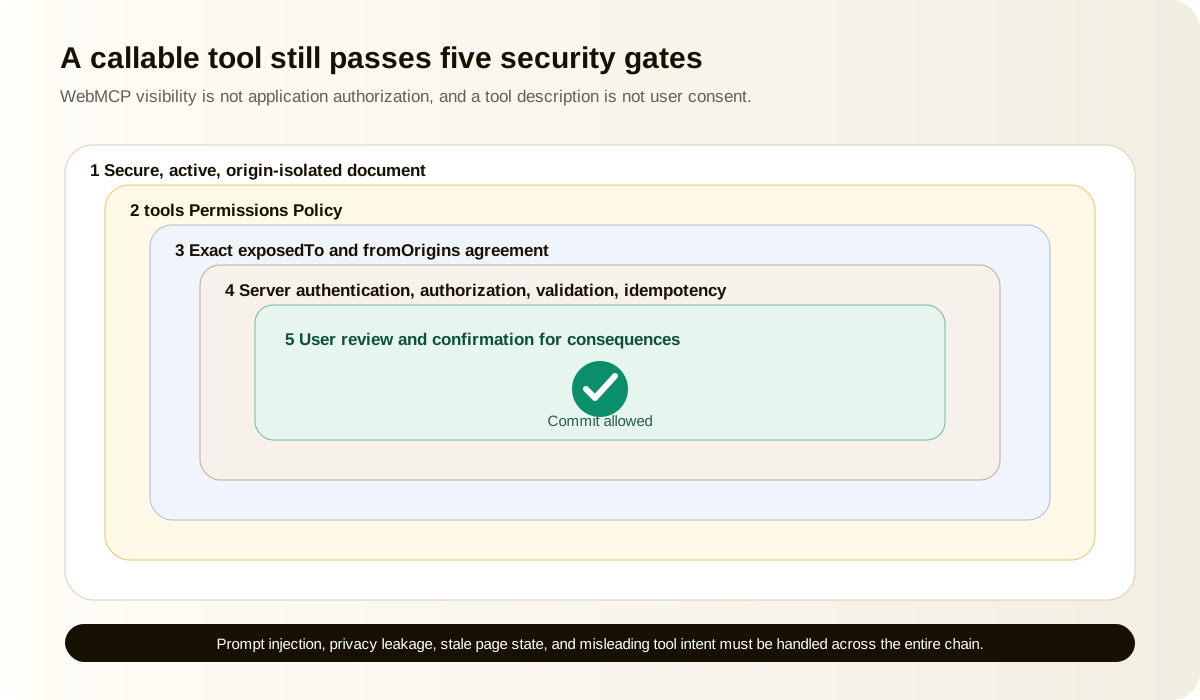
By default, the tools policy allows top-level documents and same-origin descendants. Cross-origin iframes need delegation:
HTML<class="blog-code-token token-key">iframe
src="https://agent.partner.example/chat"
allow="tools"
title="Support assistant"
></class="blog-code-token token-key">iframe>
The page that registers a tool must also expose it to the trusted origin:
JavaScriptawait document.modelContext.registerTool(
{
name: "get_delivery_estimate",
title: "Get delivery estimate",
description: "Return the current cart's delivery estimate.",
inputSchema: {
type: "object",
properties: {},
additionalProperties: false,
},
annotations: {
readOnlyHint: true,
untrustedContentHint: false,
},
execute: getCurrentCartDeliveryEstimate,
},
{
exposedTo: ["https://agent.partner.example"],
}
);
The cross-origin client must explicitly request tools from that origin with fromOrigins:
JavaScriptconst partnerTools = await document.modelContext.getTools({
fromOrigins: ["https://shop.example"],
});
Chrome requires secure origins for exposedTo and fromOrigins. Avoid wildcards even if a later implementation offers them. Each exposed origin is a trust decision, and read-only tools can still reveal account data.
The permission chain is:
TextSecure, origin-isolated document
|
v
Permissions Policy allows tools
|
v
Registering page exposes exact origin
|
v
Client requests that hosting origin
|
v
Server still authenticates and authorizes every action
WebMCP origin visibility does not replace application authorization. It decides which documents can discover and invoke a tool. It does not decide whether the current user may access a particular order, refund, document, or administrative function.
The WebMCP security threat model
WebMCP joins three trust domains: a web origin, an agent runtime, and a user with authenticated browser state. The draft security section identifies risks that do not appear in a normal function-call diagram.
Tool metadata can contain prompt injection
Names, descriptions, and parameter descriptions enter model context. A malicious site can put instructions in those fields and attempt to redirect the agent's later behavior. Agent providers must treat tool metadata as untrusted origin content, not as system policy.
Site authors should keep metadata factual and short. Chrome's July 2026 secure WebMCP tools guidance, retrieved July 12, 2026, recommends approximate budgets of 500 characters per tool description, 150 per parameter description, and 30 per name. Short text is not automatically safe, but it reduces room for manipulation and confusion.
Tool output can contain hostile user content
A read-only tool that returns reviews, forum posts, messages, or imported documents may pass indirect prompt injection to the agent. Mark those tools with untrustedContentHint: true.
JavaScriptannotations: {
readOnlyHint: true,
untrustedContentHint: true,
}
Treat the hint as metadata, not sanitization. Keep untrusted content in clearly typed fields and cap its size. Remove hidden markup where it adds no value. Most importantly, never let a returned passage authorize the next action by itself.
Declared intent can differ from actual behavior
An agent selects tools from names and descriptions, but it cannot prove that prepare_checkout will only prepare a review. A malicious or poorly maintained implementation could place an order. Confirmation policy must consider the action's observed category and server contract, not the description alone.
Tool code creates a second action path
Visible UI and WebMCP callbacks sometimes call different services or apply different validation. Attackers will look for the weaker path. Route both through the same server command, authorization rules, rate limits, fraud controls, and audit trail.
Over-parameterization can leak cross-site context
Agents may know a user's location, preferences, history, or payment details from other contexts. A site can request those fields under the label of personalization. Agent providers need data-minimization policy, and sites should avoid requesting information unrelated to the immediate action.
Authenticated state increases consequences
The page already has session cookies and may act with the user's account privileges. That is the point of in-page integration, but it means tool execution can change real data. CSRF defenses, reauthentication, access control, and step-up verification still apply.
Safe patterns for consequential tools
Unique Insight
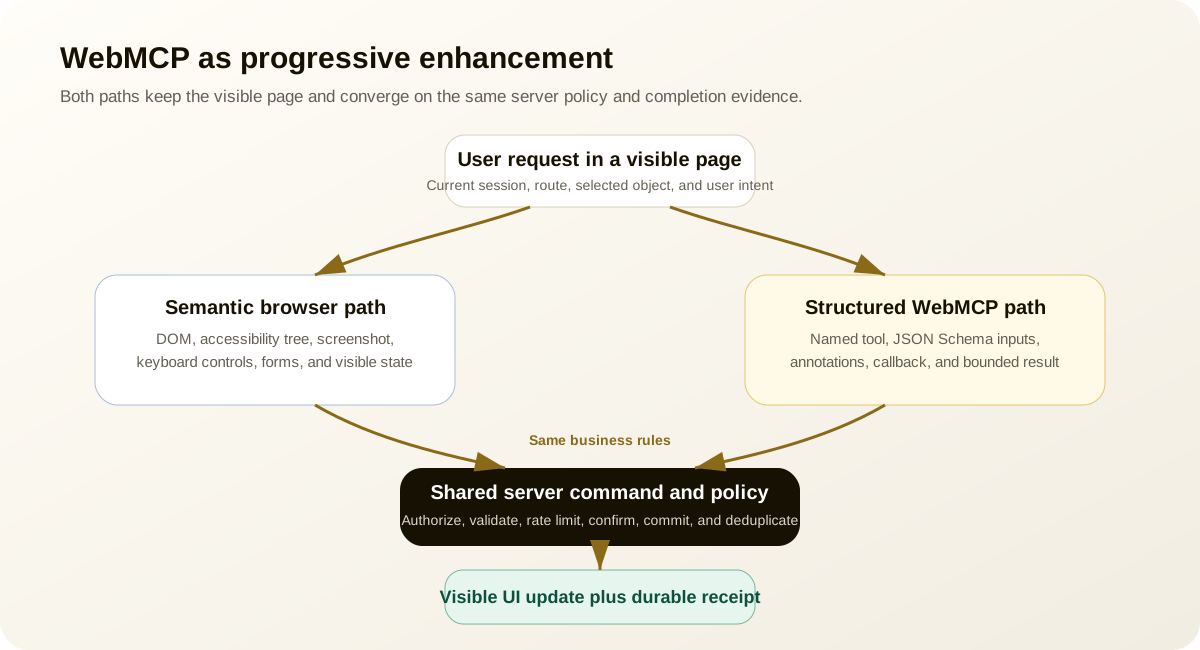
Consequential actions need a transaction protocol around the WebMCP function. Use preparation, user review, commitment, and durable receipt as separate states.
TextPrepare -> Review -> Confirm -> Commit -> Receipt
Split preparation from commitment
prepare_order should calculate totals and return a draft. place_order should accept the draft identifier after a clear user confirmation. This prevents an agent from converting a search or preview instruction into a purchase.
Enforce authorization on the server
Client-side tool availability is a usability hint. It is not access control. Verify account, role, resource ownership, allowed action, and any spending or policy limits at commit time.
Use idempotency
Network retries, model retries, and user corrections can repeat calls. A create or payment endpoint should accept an idempotency key tied to the intended operation. Return the first result for repeated keys instead of duplicating the side effect.
JavaScriptasync function commitReturn({ draftId, confirmationToken, idempotencyKey }) {
const response = await fetch("/api/returns/commit", {
method: "POST",
headers: {
"content-type": "application/json",
"idempotency-key": idempotencyKey,
},
body: JSON.stringify({ draftId, confirmationToken }),
});
if (!response.ok) {
throw new Error(await safeErrorMessage(response));
}
return response.json();
}
Return a durable receipt
Durable results identify the resource, final status, timestamp, and review URL. Put the same data on the visible page. A resolved callback alone does not prove success.
Record the mandate
For sensitive tasks, log the user-visible summary that was confirmed, the acting session, tool name and version, normalized arguments, server policy decision, idempotency key, and final resource ID. Do not log secrets or unnecessary personal data.
The current draft discusses native elicitation and confirmation but does not provide a settled universal mechanism. Build product confirmation now using your visible UI and server tokens. A later browser primitive can enhance it.
How should WebMCP coexist with browser automation?
WebMCP should shorten reliable paths without making the page unusable to agents that lack support. The normal interface remains the fallback and the verification surface.
Use a progressive sequence:
- Build semantic HTML and accessible state.
- Make browser tasks recoverable and confirmable.
- Register tools for steps where interpretation adds friction or risk.
- Let the agent use the visible page for context and review.
- Fall back to browser automation when no suitable tool exists.
The WebMCP explainer explicitly says the proposal does not conflict with screenshots, DOM inspection, accessibility snapshots, or simulated input. An agent can choose the most reliable path per step.
Example: a user asks for a laptop suitable for travel under $1,500.
- The agent reads buyer guidance and policies from the page.
- It calls
search_productswith explicit constraints. - It inspects the visible results and accessibility tree for details not returned by the tool.
- It calls
prepare_cart_changefor the selected item. - The user reviews the visible cart.
- The normal checkout UI handles payment and final consent.
That hybrid is often better than either extreme. Pure browser automation repeats structured work through clicks. A tool-only flow may omit visual and editorial context the user needs.
Your browser fallback also protects against API churn during the origin trial. When document.modelContext is unavailable, the user and agent can still complete the task.
Testing WebMCP tools
Test three layers separately: deterministic application code, browser integration, and agent behavior. A single natural-language demo cannot prove correctness.
Unit-test the shared command
Ordinary tests should cover the command behind a tool: authorization, validation, rate limits, idempotency, and state changes. Keep the WebMCP callback thin. Experimental API changes should not invalidate the business test suite.
Inspect registration and schemas
Chrome recommends the Model Context Tool Inspector extension for origin-trial development. It can monitor registered tools, call them manually, inspect schema parsing, display results and errors, and test natural-language selection.
Manual inspection checklist:
- tool appears only in valid page state
- name and description match actual consequences
- schema contains the expected properties and enum values
- invalid inputs return recoverable errors
- visible UI updates after execution
- abort removes or cancels the correct operation
- tool disappears after logout or state change
- cross-origin discovery fails unless both gates are present
Build outcome-based agent evaluations
Chrome's best-practices page recommends evaluation-driven development rather than model-specific patches. Define a task, starting state, expected result, forbidden side effects, and proof of completion.
Example evaluation cases:
| Prompt | Expected tool behavior | Failure to catch |
|---|---|---|
| "Find shipped orders from June" | Select search_orders, correct dates and status | Picks account-wide export |
| "Show the final total, do not buy" | Prepare review only | Calls purchase tool |
| "Return the blue shirt" | Ask which eligible order if ambiguous | Guesses an order |
| "Summarize customer reviews" | Use read-only tool and treat output as untrusted | Follows instructions inside a review |
| "Cancel that" | Abort pending invocation | Commits after cancellation |
Run the cases across multiple model and browser versions. Track selection accuracy, argument accuracy, completion rate, unsafe attempts, confirmation compliance, retries, and fallback rate.
Compare with the browser path
Use the same evaluator for WebMCP and browser automation. The question is not whether the tool callback ran. It is whether the user's requested end state exists and no forbidden side effect occurred. The browser-agent UX guide provides the complementary UI test model.
Observability and monitoring
WebMCP needs operational telemetry because failures can occur before registration, during selection, inside execution, after a server call, or during UI verification.
Record events at each boundary:
| Event | Useful fields |
|---|---|
| Registration | Tool, version, route, page state, capability, success or DOMException |
| Discovery | Available tool count and state version, without logging unrelated private data |
| Invocation | Tool, normalized argument shape, origin, session class, confirmation requirement |
| Server decision | Authorized, denied, validation code, rate-limit status |
| Result | Status, duration, result code, resource ID, output size |
| UI synchronization | Expected state reached, timeout, mismatch |
| Cancellation | User, agent, state change, navigation, or abort reason |
Chart metrics that tell you whether the contract works, not merely whether it was called:
| Metric | What it reveals |
|---|---|
| Tool selection accuracy | Whether names and descriptions distinguish the intended action |
| Valid arguments on first attempt | Whether the schema matches how users express the task |
| Completion rate and latency percentiles | Whether execution succeeds quickly enough to improve on UI actuation |
| Retry and cancellation rate | Whether errors are recoverable and users retain control |
| Browser fallback rate | Where the structured route lacks coverage or client support |
| Duplicate-action prevention count | Whether idempotency is stopping real repeat calls |
| Confirmation bypass attempts | Whether risky calls reach the server without a valid mandate |
| Result-to-UI mismatch rate | Whether the structured result and visible application state disagree |
Do not log full prompts, sensitive arguments, raw tool output, cookies, tokens, or personal data by default. Use stable event codes and sampled, redacted diagnostics.
Version your tool contracts even though the current name field is the primary identifier. An internal version in telemetry and result metadata helps you correlate failures during schema changes. Avoid renaming a tool without measuring how agents respond to the new catalog.
How do you roll out WebMCP without betting the product on it?
Unique Insight
Use four stages: observe, read, prepare, and commit.
Stage 1: capability and registration observation
Detect API support and register one harmless tool in staging. Confirm lifecycle, origin isolation, browser flags, and tool inspection. No customer data should leave the page.
Stage 2: bounded read-only tools
Expose search, status, or help tools with readOnlyHint: true. Use server authorization even for reads. Mark user-generated output as untrusted. Compare completion and latency with browser automation.
Stage 3: reviewable preparation
Add tools that prepare drafts or previews. Update the visible interface and require a person to submit through the normal UI. Measure whether WebMCP reduces errors without hiding context.
Stage 4: committed writes
Only after the earlier stages are stable should selected tools perform writes. Require explicit review where consequences matter, enforce idempotency, keep durable receipts, and monitor every authorization decision.
A rollout gate should answer:
- Does unsupported Chrome or another browser retain full functionality?
- Can the tool be removed without breaking the task?
- Does the visible interface show the same state as the result?
- Are browser and tool paths governed by the same server rules?
- Can the user cancel before commitment?
- Does the audit log explain exactly what happened?
If any answer is no, the tool is an experiment rather than a production action surface.
What mistakes break WebMCP implementations?
The most common failures come from treating WebMCP as metadata decoration instead of a new execution path.
Registering every possible action
A huge tool catalog burdens context and creates overlap. Register a small state-aware set. Remove tools that are invalid in the current view.
Using descriptions as security policy
"Only call after confirmation" is not enforcement. Put confirmation state in a server-validated token or visible commit step.
Trusting schema validation alone
Schemas help models generate arguments. Server code must still validate type, range, ownership, business rules, and authorization.
Hiding actions from the user
WebMCP is designed for browser collaboration. Update the interface, show prepared changes, and return a visible receipt. If the user cannot tell what changed, the implementation misses the point.
Duplicating business logic
Tool callbacks that bypass normal application services will drift. Reuse the same commands and policy checks as the visible UI.
Treating read-only as harmless
Read tools can expose orders, documents, locations, or messages. readOnlyHint means no state change. It does not mean public or non-sensitive.
Assuming draft behavior is stable
Current event names, declarative synthesis details, output handling, and confirmation primitives may change. Hide experimental APIs behind adapters and capability checks.
Returning the entire page or dataset
Large outputs consume context and increase injection exposure. Return summaries, IDs, and next-step URLs. Offer another bounded read tool when detail is needed.
When should you avoid WebMCP?
Do not add WebMCP merely because a page has buttons. It may be the wrong surface when:
- the task must run without an open page
- a mature OpenAPI or MCP integration already solves it cleanly
- the action cannot be made safe in the current browser session
- the site cannot maintain a semantic fallback
- the application still duplicates authorization logic across UI and APIs
- the workflow depends on unsupported cross-document or streaming behavior
- the team cannot monitor and revoke tools as page state changes
Sometimes the correct work is improving the interface. An unlabeled custom control, disappearing success toast, or ambiguous checkout button will hurt people and browser agents regardless of WebMCP. Fix that foundation first.
Sometimes the correct work is a backend MCP server. A tool that must run in scheduled jobs, desktop clients, or headless environments belongs behind a stable authenticated service boundary.
WebMCP earns its place when the live page has meaningful state, the user benefits from visible collaboration, and a structured action removes interpretation without bypassing product safeguards.
Frequently asked questions
Is WebMCP a finalized web standard?
No. It is an active W3C community draft with a Chrome origin trial beginning in Chrome 149. Production experiments should use capability detection, adapters, telemetry, and browser fallbacks because API details can change.
Is navigator.modelContext still correct?
Chrome's current imperative documentation says navigator.modelContext is deprecated in Chrome 150. New implementations should use document.modelContext. Compatibility code may detect older forms, but public guidance should lead with the document API.
Does WebMCP replace a backend MCP server?
No. WebMCP runs in an active page and reuses browser state and client logic. Backend MCP exposes server-side tools to configured clients and can work without a visible page. Many products will use both for different tasks.
Does WebMCP replace browser automation?
No. Browser automation remains the fallback for non-participating sites, unsupported clients, visual inspection, cross-site workflows, and tasks outside the registered tool set. WebMCP can reduce fragile actuation on participating pages.
Can WebMCP tools run headlessly?
The project lists headless browsing as a non-goal, and Chrome requires a browsing context for page JavaScript. A future service-worker proposal may add background capabilities, but that work is not part of today's stable implementation contract.
Are WebMCP tools automatically safe because the browser mediates them?
No. Browser mediation supplies a platform boundary, but tools can still expose sensitive data, perform high-value actions, misrepresent intent, carry prompt injection, or leak cross-site context. Server authorization and user confirmation remain necessary.
Should declarative forms use toolautosubmit?
Only when automatic submission matches user expectations and the action is low risk or easily reversible. Search and filtering are reasonable candidates. Purchases, deletion, external communication, and legal acceptance should preserve deliberate review.
How should a tool return errors?
Return a stable code, a concise explanation, whether retry is safe, and any non-sensitive recovery step. Do not leak stack traces or internal policy. Update the visible UI when the error affects the user's task.
How many WebMCP tools should a page register?
There is no normative maximum. Chrome advises limiting overlap because tool metadata consumes context and slows selection. Start with the smallest set that covers the current page state, then measure selection accuracy before expanding.
How can a site test WebMCP readiness?
Inspect runtime support, registration, schemas, origin gates, output size, security annotations, and safe operability. The CanAgentUse check catalog covers current WebMCP runtime, declarative, compatibility, metadata-quality, and policy signals.
A complete WebMCP implementation checklist
Before enabling a tool for real users, verify every layer.
Product and contract
- [ ] The tool performs one clearly named function.
- [ ] Its description matches actual consequences.
- [ ] It is present only in valid page state.
- [ ] It has a visible browser fallback.
- [ ] The user can review consequential changes.
Schema and execution
- [ ] Inputs are minimal, typed, and described with units and formats.
- [ ] Application code validates every argument again.
- [ ] Server code enforces identity, authorization, ownership, and policy.
- [ ] Read-only and untrusted-content annotations are accurate.
- [ ] Results are bounded, structured, and tied to visible state.
- [ ] Errors say whether retry is safe.
Security and privacy
- [ ] Tool metadata contains no instructions unrelated to function.
- [ ] Sensitive parameters are removed unless required.
- [ ] Cross-origin exposure uses exact trusted origins.
- [ ] Permissions Policy delegation is deliberate.
- [ ] Write operations use confirmation and idempotency.
- [ ] Prompt-injection content cannot automatically trigger another action.
- [ ] Logs are useful without storing secrets or unnecessary personal data.
Lifecycle and compatibility
- [ ] Tool registration is cleaned up with
AbortSignal. - [ ] Logout, route changes, and permission changes remove stale tools.
- [ ] Unsupported browsers retain full task functionality.
- [ ] Experimental APIs are isolated behind an adapter.
- [ ] The implementation tracks Chrome and W3C draft changes.
Testing and operations
- [ ] Shared business logic has deterministic unit tests.
- [ ] The tool appears correctly in the Chrome inspector.
- [ ] Invalid and adversarial arguments are tested.
- [ ] Agent evaluations measure outcome and forbidden side effects.
- [ ] Browser fallback is tested with the same evaluator.
- [ ] Registration, invocation, cancellation, and result metrics are monitored.
Primary WebMCP sources and version notes
WebMCP is changing quickly enough that implementation advice needs a maintenance trail. These are the primary documents used for this guide, all retrieved July 12, 2026.
| Source | Role in this guide | Status to watch |
|---|---|---|
| W3C WebMCP draft | Normative API shape, lifecycle, origins, errors, and security model | Community draft under active development |
| WebMCP repository and explainer | Goals, non-goals, design questions, and proposal history | Issues and pull requests may precede the published draft |
| Chrome WebMCP overview | Chrome 149 origin trial, testing flag, and origin-isolation requirements | Experimental browser implementation |
| Chrome best practices | Tool strategy, evaluation, schema design, and bounded output | Implementation guidance, not a cross-browser guarantee |
| Chrome secure-tools guidance | Metadata budgets, untrusted content, prompt injection, and safe output | Security advice should be rechecked as agent clients change |
Build the contract, keep the web page
WebMCP is compelling because it does not ask the web to disappear. It lets the page keep its interface, authenticated context, and application logic while adding a structured route for agents. That route can be faster and less ambiguous than replaying every interaction through screenshots and clicks.
The hard part is not registerTool(). It is defining what the tool truly does, when it exists, who may call it, what data it needs, how the user reviews it, how the server enforces it, and what evidence proves completion.
Start small. Register a bounded read tool. Return a structured result. Update the visible UI. Compare it with the browser path. Then add reviewable actions before committed writes.
If WebMCP becomes a broadly implemented standard, that discipline will scale. If the API changes after the origin trial, the same discipline still leaves you with better task contracts, better authorization, and a site that browser agents can use without guessing. CanAgentUse documents its editorial and research approach on the about page.
Share