
Auth.md and DNS-AID: Provider Setup Guide
Set up Auth.md and DNS-AID in 2026 with Cloudflare, Vercel, Netlify, OAuth metadata, HTTPS/SVCB records, DNSSEC, and 8 checks.
Share
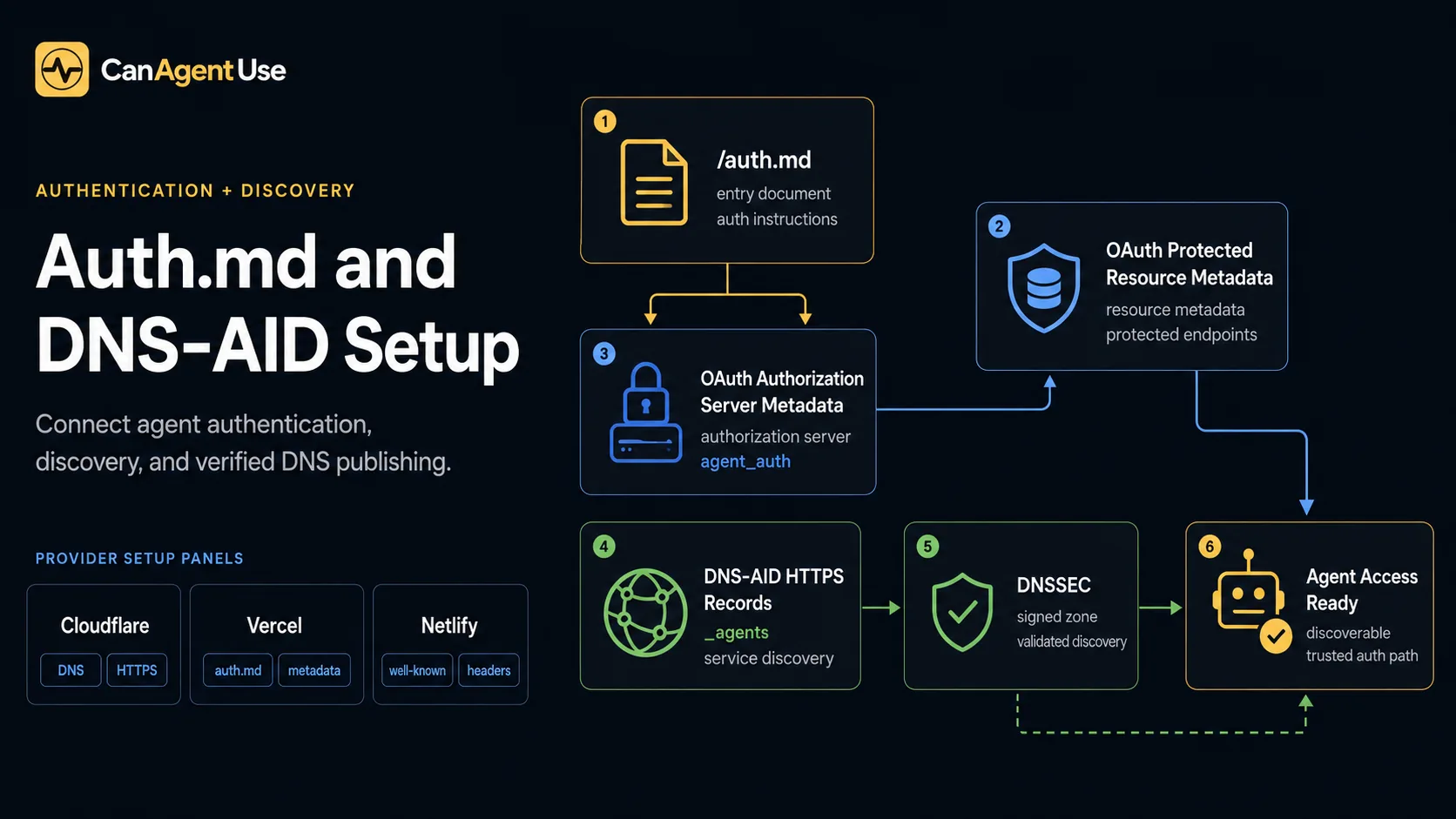
TL;DR: Auth.md and DNS-AID solve two different agent-readiness gaps. Auth.md tells agents how to register, authenticate, and request the right credentials. DNS-AID tells agents where to find agent entrypoints before they fetch HTTP metadata. Cloudflare is the easiest DNS-AID setup today because it supports HTTPS/SVCB records and DNSSEC. Vercel can host app routes and supports HTTPS DNS records. Netlify can host the files, but DNS-AID usually needs external DNS.
Auth.md and DNS-AID are new CanAgentUse checks for teams moving beyond crawlability into agent registration and DNS-based discovery. They belong after the AI bot access guide, beside agent card discovery, and before deeper MCP work such as the MCP server SEO guide. A site can be easy for humans to use and still be opaque to agents if registration instructions live only in docs or discovery starts after a crawler guesses the right URL.
This provider setup guide also complements agent-ready API research. The arXiv paper Making REST APIs Agent-Ready: From OpenAPI to MCP Servers, 2026-06-08, argues that agents need machine-usable contracts rather than prose-only API descriptions. Auth.md and DNS-AID apply the same idea to registration and discovery: publish the contract where automated clients can find it before they act.
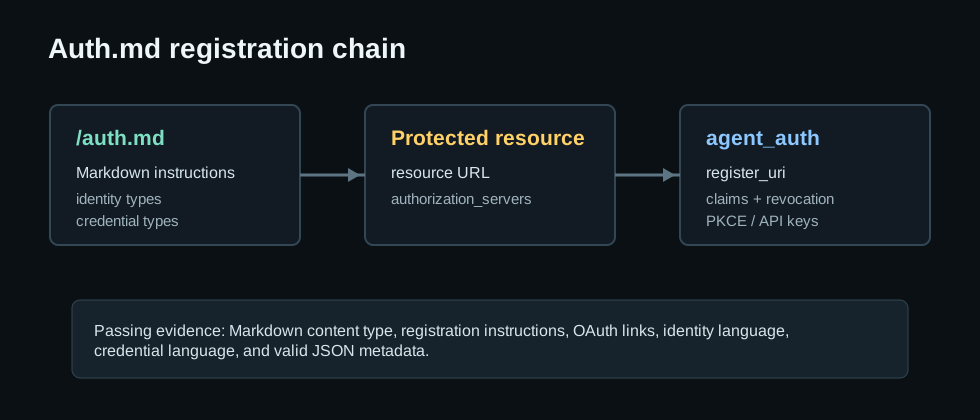
Auth.md is a root-level Markdown file that explains how automated clients register, authenticate, and find credential metadata. DNS-AID is DNS for AI Discovery: HTTPS/SVCB records under _agents that point agents to entrypoints such as agents.json or an A2A card. agent_auth metadata is an extension block in authorization-server metadata that lists registration URI, supported identity types, credential types, claims URL, and revocation URL. The setup has two layers: HTTP metadata for authentication and DNS metadata for discovery.
The failure is rarely just "no auth" or "no DNS." The break is discoverability. Agents cannot find the right auth path without scraping human docs, and they cannot find agent entrypoints until they already know where to look. A complete setup covers /auth.md, /.well-known/oauth-protected-resource, agent_auth metadata, _index._agents.<domain>, _a2a._agents.<domain>, required alpn and endpoint service parameters, and visible DNSSEC material.
What do the new Auth.md and DNS-AID checks validate?
The Auth.md check validates the HTTP registration layer, while the DNS-AID check validates the DNS discovery layer. Auth.md answers how an agent registers, which identity types are supported, which credentials are accepted, and where OAuth metadata lives. DNS-AID answers which DNS names expose agent entrypoints, which protocol is advertised, which endpoint gets fetched, and whether DNSSEC material is visible.
| Check | CanAgentUse evidence | Common failure |
|---|---|---|
/auth.md | Markdown or text response, 80+ chars, registration instructions | Human-only auth docs |
| Protected resource metadata | resource and authorization_servers JSON | Missing RFC 9728 endpoint |
agent_auth block | Register URI, identity types, credential types | OAuth metadata lacks agent registration |
| DNS-AID records | _index._agents or _a2a._agents HTTPS/SVCB records | No DNS discovery path |
| DNS-AID params | alpn and endpoint service parameters | Record exists but agents cannot route |
| DNSSEC | DNSKEY, DS, RRSIG, NSEC, or NSEC3 material | Discovery zone is unsigned |
According to RFC 9728, 2026-06-08, protected-resource metadata uses a well-known JSON document to describe the resource and authorization servers. According to RFC 8414, 2026-06-08, authorization-server metadata gives clients a machine-readable place to discover OAuth endpoints and capabilities. According to RFC 9460, 2026-06-08, SVCB and HTTPS records carry service binding parameters such as ALPN. CanAgentUse combines those standards with emerging agent metadata conventions.
What is Auth.md used for?
Auth.md is used to turn authentication from a human-only help page into an agent-readable registration contract. A human can read a login page, click a dashboard link, and infer whether API keys or OAuth are available. An agent needs a stable file that says where to register, which identity model is allowed, which credential type is accepted, which scopes are available, and where related OAuth metadata lives.
Auth.md matters most for products with both user-delegated and server-to-server access. A human-delegated agent might use OAuth authorization code with PKCE because the user is granting access. A service agent might use an API key or bearer token because it acts from a backend system. Auth.md needs to explain that split directly. Link it to /.well-known/oauth-protected-resource and /.well-known/oauth-authorization-server so clients can move from a readable registration guide to machine-readable authorization metadata.
Auth.md does not replace OAuth discovery. It gives agents the onboarding context OAuth metadata intentionally does not include. OAuth metadata can say where the token endpoint is. Auth.md can say when to use OAuth, when to use an API key, which account page creates credentials, and which scopes are least privileged for common tasks.
How to set up Auth.md
Set up Auth.md by publishing three surfaces together: /auth.md, /.well-known/oauth-protected-resource, and /.well-known/oauth-authorization-server. The Markdown file is for agents and humans. The protected-resource JSON tells clients what resource they are accessing and which authorization servers can issue tokens. The authorization-server JSON tells clients where authorization, token, JWKS, and agent registration metadata live.
A passing /auth.md response needs to be Markdown or plain text, include registration instructions, link to both OAuth metadata endpoints, mention supported identity types, and mention credential types. A minimal setup explains the site's credential model: human-delegated agents, service agents, OAuth authorization code with PKCE, API keys, bearer tokens, or another path. The agent_auth block includes register_uri, supported_identity_types, credential_types_supported, claims_url, and revocation_url where applicable.
What is DNS-AID used for?
DNS-AID gives agents a DNS-level starting point before they fetch site metadata over HTTP. Without DNS-AID, an agent has to guess whether a site uses /agents.json, /.well-known/agent-card.json, /.well-known/agent-skills/, mcp.json, or another discovery path. DNS-AID moves that first hint into DNS, where clients already start when they resolve a domain.
The design is intentionally narrow. DNS-AID does not store a full agent card, full Auth.md file, or full MCP manifest in DNS. DNS is not a good place for large or frequently edited documents. Publish small service binding records that say which protocol to use and which HTTP endpoint to fetch next. The HTTP endpoint still carries the richer metadata.
The first DNS-AID names to publish are usually _index._agents.<domain> and _a2a._agents.<domain>. _index._agents points to a general index such as agents.json. _a2a._agents points to an A2A-compatible agent card when the site exposes a remote agent. Agents then have a route from DNS lookup to HTTP metadata to auth or tool invocation.
How do you configure DNS-AID correctly?
Configure DNS-AID by adding HTTPS or SVCB records under _agents for the agent entrypoints you want clients to discover. Start with _index._agents.<domain> and _a2a._agents.<domain>. At least one usable record needs to resolve, and at least one discovered record needs both alpn and endpoint parameters. DNSSEC is not required for a record to exist, but signed DNS answers give automated clients stronger evidence.
Use _index._agents for a general agent discovery index, usually agents.json. Use _a2a._agents for an A2A-compatible agent card or remote-agent entrypoint. A typical record shape looks like this:
DNS_index._agents.example.com. 300 IN HTTPS 1 . alpn="h2,h3" endpoint="https://example.com/agents.json"
_a2a._agents.example.com. 300 IN HTTPS 1 . alpn="h2" endpoint="https://example.com/.well-known/agent-card.json"
After publishing, verify with dig HTTPS _index._agents.example.com, dig HTTPS _a2a._agents.example.com, and dig +dnssec HTTPS _index._agents.example.com. The check is strict because a DNS record without an endpoint still leaves the agent guessing.
What are HTTPS and SVCB DNS records?
HTTPS and SVCB records are DNS service binding records. An SVCB record is the generic form: it lets a domain publish configuration for a service endpoint. An HTTPS record is the HTTPS-specific form of the same idea. According to RFC 9460, 2026-06-08, these records can carry a priority, target name, and service parameters such as ALPN protocol hints.
In practical terms, an HTTPS or SVCB record can say: "For this service name, use this target and these parameters." DNS-AID uses that shape because agent discovery also needs a small, structured pointer. The record name identifies the discovery service, such as _index._agents.example.com. The alpn parameter tells clients which application protocol is expected, such as h2 or h3. The endpoint parameter tells the agent which HTTPS URL to fetch next.
DNS-AID uses HTTPS/SVCB instead of TXT because TXT is untyped text. TXT can carry arbitrary strings, but clients must invent their own parser and trust that every publisher used the same format. HTTPS/SVCB records already exist for service binding, support structured parameters, and are available in several major DNS providers. They are a better fit for machine discovery than a free-form TXT note.
Why does DNS-AID use HTTPS/SVCB records?
DNS-AID uses HTTPS/SVCB records because the discovery problem is a service-binding problem. Agents do not need a paragraph in DNS. They need a compact binding from a service label to a fetchable endpoint. HTTPS/SVCB records provide that binding with explicit service parameters, while keeping the larger agent card, Auth.md file, or agents.json document on HTTP where it can be versioned, cached, reviewed, and served with normal web tooling.
The alpn parameter tells the client what application protocol to expect. The endpoint parameter removes guesswork. Without endpoint, an agent may know that _index._agents.example.com exists but still not know whether to fetch /agents.json, /.well-known/agents.json, /agent.json, or another path. DNS-AID exists to remove that ambiguity.
HTTPS/SVCB records also support a clean provider split. The DNS team can publish _agents records, while the application team owns /auth.md, agents.json, A2A cards, and OAuth metadata. Security review gets easier when DNS changes and application changes keep their own owners.
What is DNSSEC, and why does DNS-AID care?
DNSSEC, or Domain Name System Security Extensions, lets DNS responses be authenticated. It does not encrypt DNS queries or hide which domain was requested. Instead, it helps resolvers verify that the answer came from the signed DNS zone and was not altered in transit. Google Cloud's DNSSEC overview, 2026-06-08, explains that DNSSEC helps prevent spoofing and poisoning of DNS responses.
DNS-AID cares about DNSSEC because agent discovery starts before HTTP. If a malicious or stale DNS answer points an agent to the wrong metadata endpoint, the agent may fetch the wrong index, agent card, or registration path. HTTPS still protects the HTTP connection after the endpoint is chosen, but DNSSEC helps protect the discovery pointer itself. Records can work without DNSSEC, but signed discovery is safer.
To enable DNSSEC, turn it on at the authoritative DNS provider, confirm the zone has DNSKEY/RRSIG material, and publish the DS record at the registrar or parent zone when required. Then test from a validating resolver. If the DNS host and registrar are different, this is a two-party setup: the DNS host signs the zone, and the registrar publishes the delegation signer record.
How do you set this up on Cloudflare?
Cloudflare is the most straightforward provider for DNS-AID because Cloudflare's DNS record type docs, 2026-06-08, list SVCB and HTTPS record support, and Cloudflare's DNSSEC docs, 2026-06-08, explain how to sign a zone. In Cloudflare DNS, add HTTPS records for _index._agents and _a2a._agents, keep manual HTTPS records DNS-only when Cloudflare requires it, and include alpn plus endpoint parameters. Then enable DNSSEC from the DNS settings or registrar flow.
For Auth.md on Cloudflare Pages, deploy /auth.md as a static file or route. For Cloudflare Workers, return content-type: text/markdown; charset=utf-8 from /auth.md and JSON from the two well-known OAuth endpoints. Cloudflare Registrar DNSSEC docs, 2026-06-08, also describe registrar-side DNSSEC enablement, which matters when the registrar and DNS host are both Cloudflare.
How do you set this up on Route 53, Google Cloud DNS, and DNSimple?
Amazon Route 53 supports both HTTPS and SVCB record types. Route 53's record type documentation, 2026-06-08, describes SVCB as a generic service configuration record and shows the SvcPriority TargetName SvcParams value format. For DNS-AID, create records such as _index._agents.example.com and _a2a._agents.example.com, choose HTTPS or SVCB, use service mode priority, set the target name, and add service parameters for alpn and endpoint. Route 53 also supports DNSSEC signing for public hosted zones, but you must complete the DS record step at the registrar if the domain is registered elsewhere.
Google Cloud DNS supports HTTPS and SVCB records. Google Cloud DNS record docs, 2026-06-08, describe HTTPS/SVCB values as service priority, target name, and service parameters consisting of key=value pairs. In Cloud DNS, create the _agents records in the public managed zone, use . as the target name when the service is at the owner name, and include alpn and endpoint. Google Cloud's DNSSEC overview explains that Cloud DNS can manage DNSSEC keys and RRSIG records for the zone, while the TLD registry still needs the DS record through the registrar.
DNSimple supports managing SVCB and HTTPS service binding records through its DNS record editor. DNSimple is a good fit when the app is hosted elsewhere but DNS needs modern record support. Add the _index._agents and _a2a._agents records in DNSimple, then point endpoint to the app host, such as Vercel, Netlify, Fly.io, Render, or Cloudflare Pages. If DNSSEC is enabled in DNSimple, confirm the DS record is active at the registrar.
What about Vercel, Netlify, and other providers?
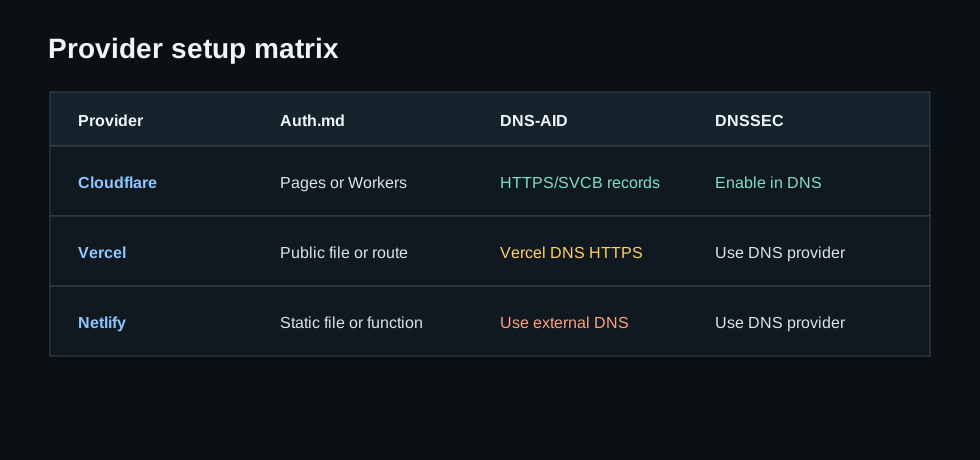
Vercel can host Auth.md with a static public/auth.md file or an app route, and Vercel's changelog, 2026-06-08, announced HTTPS DNS record support for Vercel DNS. If DNS is managed in Vercel, add HTTPS records for _index._agents and _a2a._agents where the dashboard or API supports them. If DNS is managed somewhere else, configure DNS-AID at that DNS host and keep the HTTP endpoints on Vercel.
Netlify can host /auth.md and the OAuth metadata endpoints through static files, redirects, or serverless functions, but Netlify DNS record documentation, 2026-06-08, currently lists common record types such as A, AAAA, CAA, CNAME, MX, NS, SRV, and TXT, not HTTPS or SVCB. For a Netlify site, split the work: host Auth.md on Netlify, but manage DNS-AID at Cloudflare, Vercel DNS, Route 53, Google Cloud DNS, DNSimple, NS1, or another DNS provider that supports HTTPS/SVCB records and DNSSEC.
For any provider, avoid fake DNS-AID with TXT records when the client expects HTTPS/SVCB. A TXT note may help humans, but it will not satisfy DNS-AID discovery because agents need service binding records with routable parameters.
| Provider | Auth.md hosting | DNS-AID records | DNSSEC path |
|---|---|---|---|
| Cloudflare | Pages static file or Worker route | HTTPS/SVCB in Cloudflare DNS | Enable DNSSEC in Cloudflare, then registrar DS if needed |
| Route 53 | Any app host or S3/CloudFront | HTTPS/SVCB in public hosted zone | Enable DNSSEC signing and publish DS at registrar |
| Google Cloud DNS | Any app host or Cloud Run/Cloud Storage | HTTPS/SVCB in public managed zone | Enable DNSSEC in Cloud DNS and publish DS at registrar |
| DNSimple | Any app host | HTTPS/SVCB in DNSimple DNS | Enable DNSSEC and confirm DS delegation |
| Vercel | public/auth.md or app route | HTTPS records in Vercel DNS when DNS is hosted there | Use Vercel DNS/registrar support or external DNS provider |
| Netlify | Static file, redirect, or function | Use external DNS for HTTPS/SVCB | Use external DNS provider with DNSSEC |
What rollout order works?
The safest rollout order is Auth.md first, OAuth metadata second, DNS-AID third, and DNSSEC last. Publish /auth.md with a short registration path, supported identity types, credential types, and links to the two well-known OAuth endpoints. Then publish protected-resource metadata and authorization-server metadata with agent_auth. Add DNS-AID records only after the HTTP resources exist. Enable DNSSEC and confirm the registrar has the DS record when the DNS provider requires registrar-side activation.
This order prevents two common launch failures. Teams avoid publishing DNS records that point to missing agent files. They also avoid advertising an Auth.md contract before the token or API-key workflow exists. Each rollout step needs a rollback plan. If DNS-AID fails, remove or lower the TTL on the _agents record while keeping Auth.md live. If Auth.md fails, keep the OAuth endpoints private until registration instructions and scopes are accurate.
How do you verify the setup?
Verify Auth.md over HTTP and DNS-AID through DNS before treating the setup as ready. Use curl -i https://example.com/auth.md to confirm the content type is Markdown or plain text. Then use curl -s https://example.com/.well-known/oauth-protected-resource and curl -s https://example.com/.well-known/oauth-authorization-server to confirm the JSON endpoints return the expected resource, authorization server, and agent_auth fields. After that, use dig HTTPS _index._agents.example.com and dig HTTPS _a2a._agents.example.com to confirm service binding records resolve.
For DNSSEC, run dig +dnssec HTTPS _index._agents.example.com and inspect whether DNSSEC material appears from the resolver. Do not treat a local resolver failure as final proof. Some enterprise resolvers suppress DNSSEC details. Compare results from at least one public validating resolver and the provider dashboard. Then review the Auth.md and DNS-AID evidence separately. That keeps application bugs, DNS configuration errors, and resolver behavior from being mixed into one vague failure.
What fails most often?
Auth.md fails when the site publishes human login documentation but no agent registration contract. Common breaks include text/html instead of Markdown, missing links to OAuth metadata, no identity-type language, no credential-type language, and no agent_auth block. DNS-AID fails when the site uses unsupported record types, puts records at the wrong DNS name, omits endpoint, omits alpn, or forgets DNSSEC.
Treat Auth.md as the registration contract and DNS-AID as the prefetch discovery contract. Auth.md tells the agent how to ask for access. DNS-AID tells the agent where to start. Together, they make agent access less dependent on scraping docs, guessing URLs, or copying human login flows.
Definitions
Auth.md definition
Auth.md is a root-level Markdown registration file that tells automated clients how to authenticate with a site. A strong Auth.md file is Markdown or plain text, has enough content, includes registration instructions, links to /.well-known/oauth-protected-resource, links to /.well-known/oauth-authorization-server, mentions supported identity types, and mentions credential types. This makes Auth.md different from a normal login help page. A human help page may explain how users sign in, but Auth.md explains how agents register, which identities are supported, and which credentials are accepted. That contract helps agents discover the right path without scraping account docs or guessing whether OAuth, API keys, bearer tokens, or service-agent credentials are available. It also gives security reviewers one stable file to inspect before approving automated access.
DNS-AID definition
DNS-AID is DNS for AI Discovery: a way to publish agent entrypoints under _agents before an automated client fetches HTTP metadata. A DNS-AID check looks for _index._agents.<domain> and _a2a._agents.<domain> HTTPS or SVCB records, then verifies whether discovered records include alpn and endpoint service parameters. A DNS record without an endpoint still leaves the agent guessing. _index._agents points to a general agent index such as agents.json, while _a2a._agents can point to an A2A-compatible agent card. DNSSEC adds an authenticity layer by letting validating resolvers confirm that the discovery data came from the signed zone rather than an altered response. DNS-AID is a routing layer, not a replacement for HTTP metadata or agent cards.
Cloudflare setup
Cloudflare is currently the easiest DNS-AID provider path because its DNS docs list SVCB and HTTPS record support, and its DNSSEC docs explain zone signing. A Cloudflare setup adds HTTPS records for _index._agents and _a2a._agents, includes alpn and endpoint parameters, keeps manually added HTTPS records DNS-only when required, and enables DNSSEC for the zone. Auth.md can be served from Cloudflare Pages as a static file or from Workers as a Markdown response. Cloudflare DNS handles DNS-AID, while the web app still needs /auth.md and the OAuth well-known endpoints to return correct HTTP metadata. This split gives DNS work and application work separate owners during rollout.
Provider split
Provider setup separates HTTP hosting from DNS record capability. Vercel can host /auth.md through static files or app routes and has announced HTTPS DNS record support for Vercel DNS, so it can cover both layers when DNS is managed there. Netlify can host /auth.md and OAuth metadata through static files, redirects, or functions, but its DNS record documentation does not currently list HTTPS or SVCB records. A Netlify site may need split ownership: host Auth.md on Netlify, then publish DNS-AID at Cloudflare, Vercel DNS, Route 53, NS1, or another DNS provider that supports HTTPS/SVCB records and DNSSEC. A good audit reports that split instead of treating the whole setup as one provider failure.
FAQ
Is Auth.md the same as OAuth discovery?
No. OAuth discovery publishes machine-readable authorization metadata. Auth.md is a Markdown registration guide that links to OAuth metadata and explains identity and credential requirements for agents.
Do I need DNS-AID if I already have agents.json?
Not always, but DNS-AID gives agents a DNS-level starting point. agents.json still works as the HTTP index that DNS-AID can point to.
Can I use TXT records for DNS-AID?
Not for DNS-AID clients that expect service binding records. Use SVCB or HTTPS records under _agents, with alpn and endpoint parameters.
What does CanAgentUse check?
CanAgentUse checks /auth.md, OAuth protected-resource metadata, agent_auth authorization metadata, _index._agents and _a2a._agents HTTPS/SVCB records, required service parameters, and DNSSEC material.
Research sources
- CanAgentUse, Auth.md Agent Registration skill, 2026-06-08.
- CanAgentUse, DNS-AID Agent Discovery skill, 2026-06-08.
- RFC 9728, OAuth 2.0 Protected Resource Metadata, 2026-06-08.
- RFC 8414, OAuth 2.0 Authorization Server Metadata, 2026-06-08.
- RFC 9460, Service Binding and HTTPS DNS Resource Records, 2026-06-08.
- Cloudflare DNS, DNS record types, 2026-06-08.
- Cloudflare DNS, DNSSEC, 2026-06-08.
- Cloudflare Registrar, enable DNSSEC, 2026-06-08.
- Amazon Route 53, supported DNS record types, 2026-06-08.
- Google Cloud DNS, DNS records overview, 2026-06-08.
- Google Cloud DNS, DNSSEC overview, 2026-06-08.
- DNSimple, manage service binding records, 2026-06-08.
- Vercel, HTTPS DNS records are supported in Vercel DNS, 2026-06-08.
- Netlify Docs, DNS records, 2026-06-08.
- arXiv, Making REST APIs Agent-Ready: From OpenAPI to MCP Servers, 2026-06-08.
Share