
AI Bot Access: Web Bot Auth Audit Guide
Audit AI bot access with Web Bot Auth, signed agents, Cloudflare verified bots, HTTP message signatures, OAuth, API keys, and edge rules.
Share
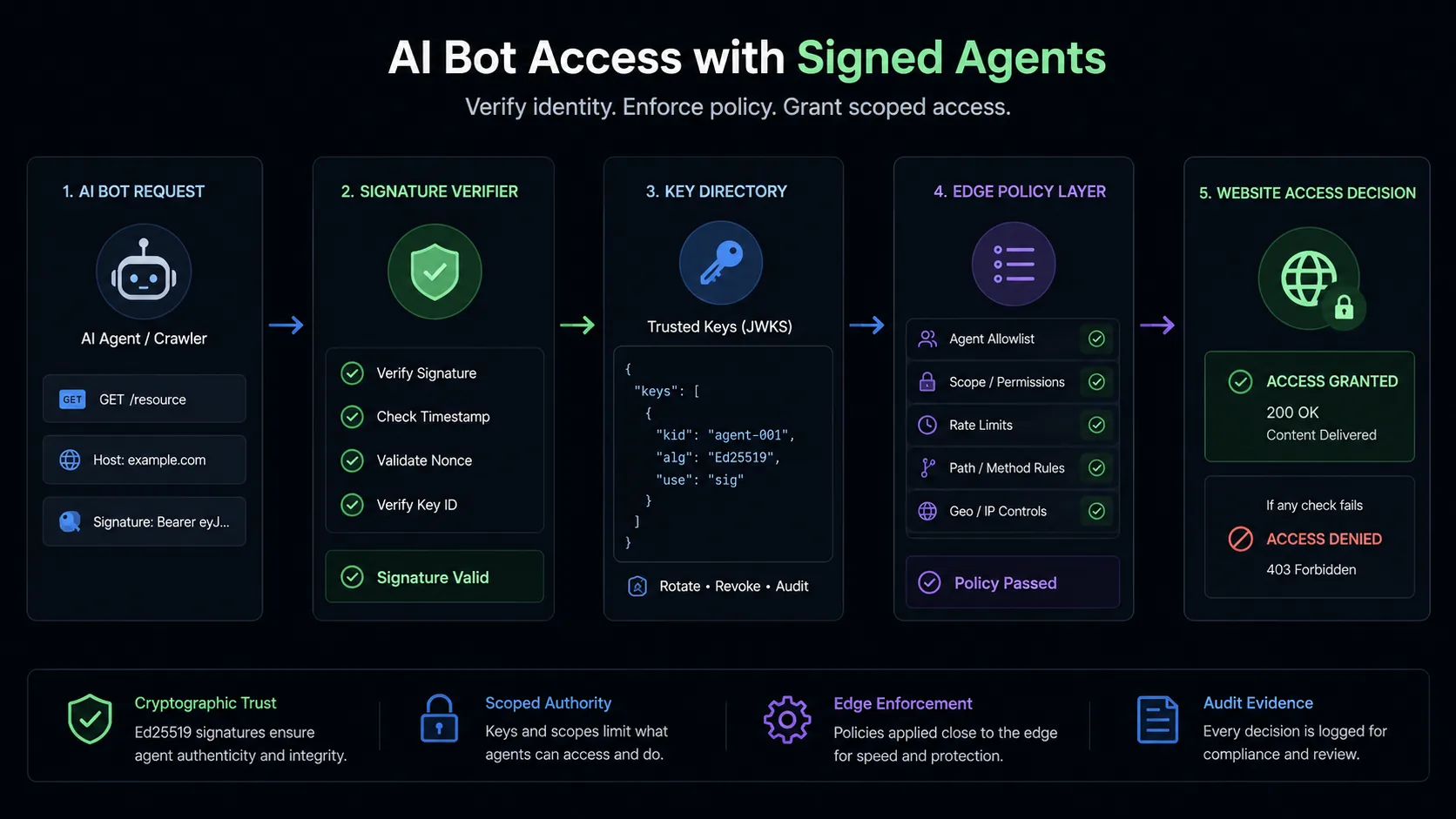
TL;DR: AI bot access is the access-control layer for crawlers, answer engines, browser agents, and signed agents. A good audit separates bot identity from user authorization. Web Bot Auth proves which automated client sent a request. OAuth, API keys, sessions, or Cloudflare Access prove whether that client may act for a user or account. Do not collapse those into one rule.
AI bot access used to mean "can Googlebot crawl the page?" That is too small now. A modern site may want OpenAI, Perplexity, Claude, Bing, Google, monitoring tools, and user-directed agents to fetch public evidence. The same site also needs to keep login, checkout, billing, admin, and API actions behind real authorization. The hard part is no longer just blocking bad bots. The hard part is giving the right automated clients the right lane.
This checklist fits beside the AI crawler access guide, the AI crawler audit guide, and the Auth.md and DNS-AID provider setup guide. Crawl policy, bot identity, and account authorization are separate layers. If a site mixes them together, it either blocks legitimate AI retrieval or lets automation reach places it should never reach.
AI bot access is the set of rules, identity checks, auth checks, edge decisions, and logs that decides how automated AI clients reach a website. Bot authentication proves the automated client. User authorization proves permission to act for a person, workspace, account, or service. Signed agents are bots or browser agents that attach HTTP message signatures so the receiving site or CDN can verify identity cryptographically.
What is bot authentication?
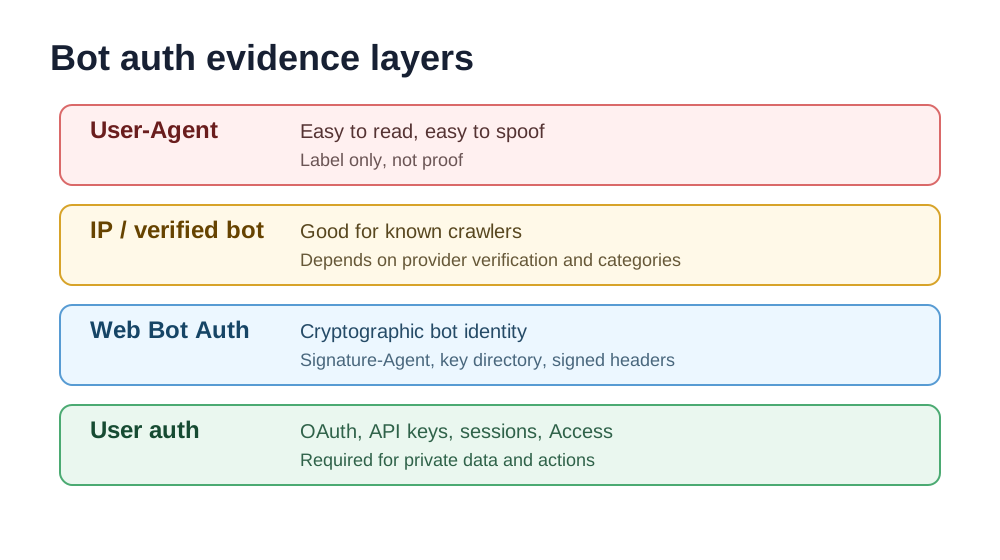
Bot authentication is how a site verifies that an automated request really came from the bot, crawler, or agent it claims to be. A User-Agent string is not authentication. Anyone can send GPTBot, Googlebot, or ClaudeBot in a header. A good bot-auth system needs an independent proof: reverse DNS, known IP ranges, CDN verification, a verified-bot directory, mTLS, or an HTTP message signature.
Cloudflare describes Web Bot Auth as a bot verification method based on cryptographic signatures in HTTP messages. The request carries Signature, Signature-Input, and Signature-Agent headers. The Signature-Agent points to a public key directory. The verifier uses the public key and signed request components to decide whether the request was really signed by that bot or agent.
That proof still has a narrow job. Bot auth answers "who sent this automated request?" It does not answer "is this bot allowed to buy something, edit a record, download private data, or act for Alice?" Sensitive actions still need user or service authorization.
What are the main types of AI bot auth?
AI bot access usually combines several identity and authorization methods. Treat them as layers, not rivals.
| Method | What it proves | Good for | Weakness |
|---|---|---|---|
| User-Agent | Claimed software name | Basic logging and robots rules | Spoofable |
| Reverse DNS and IP verification | Request came from known infrastructure | Search crawlers and old verified-bot flows | Brittle for distributed agents |
| Cloudflare verified bot | Cloudflare classified request as known good bot | Search, monitoring, SEO crawlers | Depends on CDN classification |
| Web Bot Auth | Request was signed by a known bot or agent key | Signed agents and modern bot identity | Requires key directory and signature handling |
| OAuth/OIDC | User or account delegated access | Private APIs, account data, user actions | More setup and consent design |
| API key or bearer token | Service credential or server-to-server access | Backend automation | Often overbroad if scopes are missing |
| Cloudflare Access or mTLS | Network or identity-aware perimeter | Internal apps, staging, admin paths | Not a public crawler solution |
The safest pattern is boring: public retrieval can rely on crawler policy plus bot identity. Account-specific reads need OAuth, session auth, or API keys. Writes, purchases, billing, deletion, and admin actions need scoped authorization, confirmation, and logs.
How does Web Bot Auth work?
Web Bot Auth uses HTTP Message Signatures for automated traffic. The bot or agent signs selected request components, publishes a public key directory, and sends signature headers with each request. Cloudflare's docs currently use Ed25519 examples and describe a key directory at /.well-known/http-message-signatures-directory with a JSON Web Key Set.
The practical flow looks like this:
- Generate a signing key pair for the bot or agent.
- Publish the public keys in a key directory.
- Register the bot, agent, or key directory when using a verified-bot program.
- Sign requests with
SignatureandSignature-Input. - Send
Signature-Agentpointing to the key directory. - Verify the signature, key ID, timestamp, expiry, tag, and signed components.
- Feed the verified identity into the edge policy.
HTTPGET /docs/agent-readiness HTTP/1.1
Host: example.com
User-Agent: ExampleAgent/1.0
Signature-Agent: "https://agent.example/.well-known/http-message-signatures-directory"
Signature-Input: sig1=("@authority" "signature-agent");created=1780000000;expires=1780000060;keyid="thumbprint";alg="ed25519";tag="web-bot-auth"
Signature: sig1=:base64-signature:
The details matter. Signature-Agent needs to be an HTTPS URI and, in Cloudflare's implementation, must be included in the signed component list. created and expires reduce replay risk. keyid maps the signature to a public key. The tag tells the verifier this signature is for bot authentication, not some unrelated signing scheme.
What is the Cloudflare allowed bots list?
Cloudflare maintains an internal directory of verified bots and signed agents. For a public view, use the Cloudflare Radar Bots Directory. For automation, use the Cloudflare Radar bots API, which supports filters such as botVerificationStatus=VERIFIED, kind=AGENT, kind=BOT, and response format.
Terminalcurl "https://api.cloudflare.com/client/v4/radar/bots?botVerificationStatus=VERIFIED&format=JSON" \
-H "Authorization: Bearer $CLOUDFLARE_API_TOKEN"
curl "https://api.cloudflare.com/client/v4/radar/bots?kind=AGENT&format=JSON" \
-H "Authorization: Bearer $CLOUDFLARE_API_TOKEN"
Do not copy a static allowlist into a blog post and treat it as permanent. Bot operators, categories, and signatures change. In a real audit, record the list source, the query used, the date checked, and the rule that consumes the result.
Cloudflare also documents a managed AI Bots rule. As of the referenced docs, the named list includes Amazonbot, Applebot, Bytespider, ClaudeBot, DuckAssistBot, Google-CloudVertexBot, GoogleOther, GPTBot, Meta-ExternalAgent, PetalBot, TikTokSpider, and CCBot. Cloudflare notes that verified AI crawlers and similar unverified bots may also be included, and that categories can change.
Which Cloudflare fields matter for bot access?
On Cloudflare, the policy usually starts with verified bot and bot-management fields. Exact availability depends on plan and product, but these are the important concepts to audit:
| Cloudflare signal | Meaning | Audit use |
|---|---|---|
cf.bot_management.verified_bot | Request originates from a Cloudflare allowed bot | Skip unnecessary challenges for trusted crawlers |
cf.bot_management.signed_agent | Request originated from a known signed agent | Segment signed agent traffic |
cf.verified_bot_category | Bot category such as AI crawler or search crawler | Allow search while restricting training crawlers |
cf.bot_management.score | 1-99 bot likelihood score | Challenge or block likely automation on sensitive paths |
cf.bot_management.detection_ids | Specific heuristic detections | Investigate scraping, account abuse, or odd clients |
A common Cloudflare mistake is allowing or blocking all bots with one rule. Better: allow verified search and monitoring bots to public content, log signed agents first, challenge unknown automation on account paths, and require account auth for private APIs.
TXTAllow or skip public docs:
cf.bot_management.verified_bot and http.request.uri.path starts_with "/docs"
Challenge likely automation on login:
cf.bot_management.score lt 30
and not cf.bot_management.verified_bot
and http.request.uri.path in {"/login" "/account" "/checkout"}
Log signed agents during rollout:
cf.bot_management.signed_agent
Use Log first where possible. Move to Skip, Managed Challenge, or Block only after reviewing Security Events and origin logs.
How do you validate bot auth correctly?
Validate bot auth in two directions: can trusted automation reach public evidence, and are sensitive actions still protected?
| Test | Expected result | Evidence |
|---|---|---|
| Known search bot to public docs | Allowed or clean 200/301 | Status, verified bot field, no challenge |
| AI crawler to public content | Allowed or blocked by explicit policy | Bot category and rule ID |
| Unknown bot with spoofed UA | Not treated as trusted | No verified flag, challenged or logged |
| Signed agent with valid signature | Verified as signed or allowed by identity policy | Signature fields, key ID, rule match |
| Signed agent with expired signature | Rejected or falls back to untrusted handling | Expiry failure, no verified identity |
| Account page without user auth | 401, 403, login, or Access challenge | Auth challenge and no data leakage |
| API action without OAuth/API key | 401 with correct auth metadata | WWW-Authenticate, OAuth metadata |
| API action with least-privilege token | Allowed only for scoped task | Token scope, request ID, audit log |
This is where shallow bot-access guidance breaks down. A signed request to /pricing and a signed request to /api/delete-account cannot share one verdict. The first is a retrieval decision. The second is an authorization decision.
How do you validate Web Bot Auth headers?
For incoming signed traffic, capture the raw headers before the CDN or app normalizes them. Then check:
Signature-Agentexists, is HTTPS, and points to the expected key directory.Signature-Inputincludessignature-agentand the signed request components.createdandexpiresare present and the validity window is short.keyidmaps to a key in the directory.tagis set for Web Bot Auth.- The signature verifies over the exact signature base.
- Failed verification does not silently become trusted traffic.
If Cloudflare verifies the request, inspect Security Events, Bot Management fields, and Workers request.cf.botManagement where available. If you verify at origin, use the same evidence model: key directory fetched, key selected, signature base built, signature passed or failed, decision logged.
How should bot auth and user auth work together?
Think in two gates.
Gate one is client identity: the site decides whether the requester is Googlebot, GPTBot, a signed browser agent, a monitoring bot, or unknown automation. Web Bot Auth, verified-bot directories, reverse DNS, IP validation, and bot scores live here.
Gate two is resource authorization: the site decides whether the requester may access this resource for this user, account, workspace, or service. OAuth, OIDC, API keys, bearer tokens, session cookies, Cloudflare Access, and mTLS live here.
| Resource | Bot identity requirement | User/account auth requirement |
|---|---|---|
| Public docs | Crawler policy or verified bot | None |
| Public product page | Usually none, optional bot policy | None |
| Search-only preview endpoint | Verified search or signed retrieval agent | None or rate-limited token |
| Account dashboard | Bot identity is not enough | Session, OAuth, or Access |
| Order status API | Bot identity is not enough | Scoped OAuth or API key |
| Purchase, refund, deletion | Bot identity is not enough | Strong auth, scope, confirmation, logs |
The benefit of signed bot auth is not that it lets agents do everything. The benefit is that it removes identity theater. Once the site knows which automated client is present, it can apply precise policy instead of treating every Chrome-looking agent as either human or hostile.
What should a signed-agent audit report?
A signed-agent audit should report the whole decision chain:
| Audit area | What to capture |
|---|---|
| Policy intent | Which bots, agents, and crawler categories are allowed or blocked |
| Cloudflare directory evidence | Radar directory/API query, bot kind, category, operator, verification status |
| Edge rule evidence | Rule expression, action, order, and Security Events sample |
| Signature evidence | Signature-Agent, Signature-Input, key ID, timestamp, expiry, signature result |
| Public-content behavior | Status codes for docs, blog, pricing, robots, llms.txt, sitemap |
| Private-path behavior | Login, checkout, account, API, admin, and write-action outcomes |
| User auth evidence | OAuth metadata, protected-resource metadata, scopes, API-key behavior |
| Logs | Request ID, bot fields, signature fields, token subject, scope, decision |
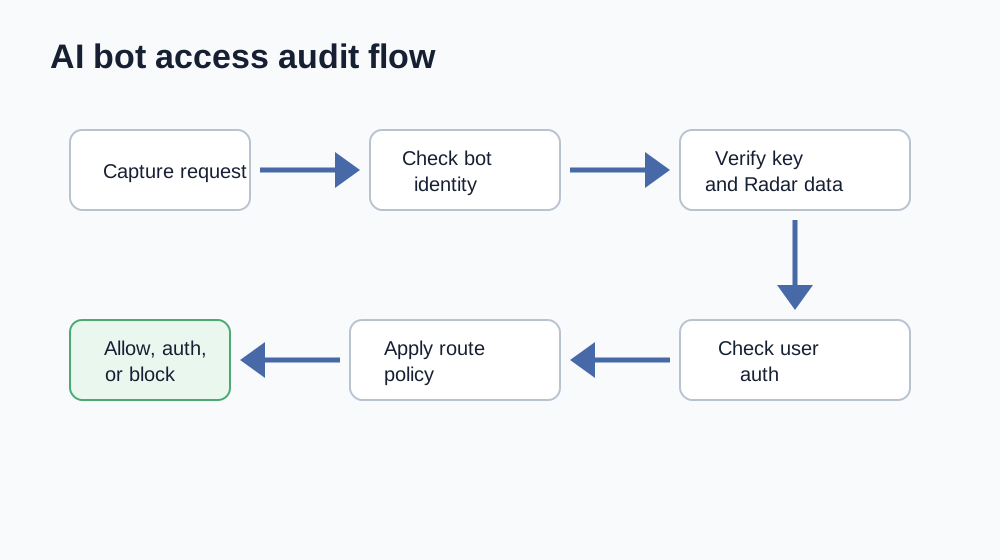
The final report should say something concrete, not "bot access passed." Better: "Verified search bots can fetch public docs. Cloudflare's AI Bots managed rule blocks training crawlers. Signed agents are logged on public routes but still require OAuth for account APIs. Spoofed GPTBot traffic is not treated as verified. Checkout and deletion endpoints return 401 without scoped user authorization."
What are the benefits of signed agent auth?
Signed agent auth gives site owners a better control surface:
- Less User-Agent spoofing because identity is tied to a private key.
- Better logs because the verifier can record bot identity, key ID, and signature status.
- More precise Cloudflare rules because signed agents can be segmented from generic bots.
- Safer AI access because public retrieval and private action paths can diverge.
- Better agent ecosystem incentives because transparent agents can earn access without pretending to be browsers.
It also helps bot operators. A legitimate agent can prove itself without publishing brittle IP ranges for every execution environment. That matters for browser agents, hosted agents, and user-directed agents where traffic does not look like an old search crawler.
What standards are emerging around this?
Web Bot Auth builds on RFC 9421 HTTP Message Signatures and is being discussed through the IETF Web Bot Auth working group. Cloudflare's docs describe active drafts for a key directory and bot-auth protocol. Recent IETF materials describe Signature-Agent, Accept-Signature, nonces, anti-replay concerns, and implementation work across several languages.
The pattern is already visible, even while the ecosystem is still moving: bot identity is shifting away from spoofable labels and IP-only heuristics toward cryptographic proof. That will not replace OAuth, API keys, or user consent. It gives those systems a cleaner requester identity to work with.
Common mistakes
Do not make these mistakes:
- Treat
User-Agentas proof. - Allow all verified bots into account or checkout paths.
- Block all AI bots without checking whether search, answer, or assistant retrieval should remain available.
- Treat a valid Web Bot Auth signature as user consent.
- Publish a key directory but forget to sign requests.
- Use long signature expiry windows.
- Fail closed on public docs without realizing AI answer systems can no longer fetch citations.
- Fail open on private APIs because the requester was a signed agent.
- Skip logs for rejected signed-agent attempts.
- Copy a stale bot list instead of using Cloudflare Radar or API data.
FAQ
Is Web Bot Auth the same as OAuth?
No. Web Bot Auth proves the identity of an automated client. OAuth proves delegated access to a protected resource. A signed agent may still need OAuth before reading account data or taking action for a user.
Does Cloudflare have a public verified bot list?
Cloudflare exposes a public Radar Bots Directory and a Radar bots API. Cloudflare also maintains internal verified-bot and signed-agent directories used by its products. Use the public directory or API for audit evidence, and avoid hardcoding a stale copy.
Which Cloudflare bots are blocked by the AI Bots rule?
Cloudflare's docs currently name bots such as Amazonbot, Applebot, Bytespider, ClaudeBot, DuckAssistBot, Google-CloudVertexBot, GoogleOther, GPTBot, Meta-ExternalAgent, PetalBot, TikTokSpider, and CCBot. The rule may also include verified AI crawlers and similar unverified bots, and Cloudflare says categories can change.
Should signed agents be allowed everywhere?
No. A signed agent has stronger identity proof, not universal permission. Allow or log signed agents on public retrieval paths first. Require user or service authorization for private data, writes, payments, and admin workflows.
What does CanAgentUse check?
CanAgentUse checks policy intent, AI bot-specific rules, transport status, signed-agent evidence, public key-directory signals, protected paths, and logs. The goal is not a vanity score. It is evidence showing which bots can fetch public content and which sensitive paths remain protected.
Research sources
- Cloudflare, Web Bot Auth documentation, 2026-06-09.
- Cloudflare, Bot Management variables, 2026-06-09.
- Cloudflare, Bots concepts and AI bots list, 2026-06-09.
- Cloudflare Radar, Bots Directory, 2026-06-09.
- Cloudflare API, List bots, 2026-06-09.
- Cloudflare, Message Signatures are now part of our Verified Bots Program, 2026-06-09.
- Cloudflare, Forget IPs: using cryptography to verify bot and agent traffic, 2026-06-09.
- Cloudflare, The age of agents: cryptographically recognizing agent traffic, 2026-06-09.
- GitHub, cloudflare/web-bot-auth, 2026-06-09.
- IETF Datatracker, Web Bot Auth working group, 2026-06-09.
- RFC 9421, HTTP Message Signatures, 2026-06-09.
Share