
AI Crawler Audit: Robots.txt Is Not Enough
Run a 7-layer AI crawler audit across 13 bots, robots.txt, Content-Signal, WAF rules, status codes, logs, IP verification, retrieval proof, and fixes.
Share
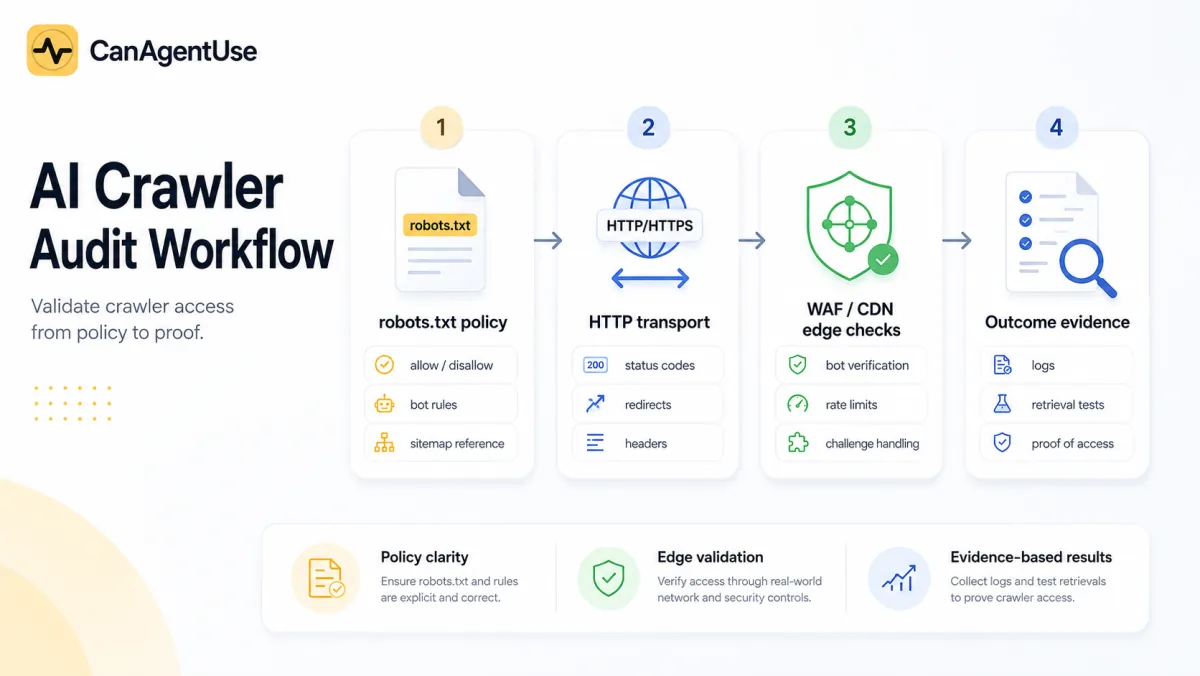
TL;DR: A real AI crawler audit checks policy, bot coverage, file discovery, edge behavior, status codes, logs, and retrieval outcomes.
robots.txtis only the first layer. Audit all major AI bot user agents, verify WAF/CDN behavior, separate training from search and user-fetch traffic, and record evidence for every public page class.
Most AI crawler advice stops at robots.txt. That is too thin. A site can publish a perfect robots file and still fail AI retrieval because a WAF challenges the request, a CDN blocks unknown agents, a sitemap points to stale URLs, or the policy ignores half the bots that now matter.
Use this guide after the AI crawler access policy and the llms.txt vs robots.txt publishing guide. It also supports the GEO vs SEO strategy, because AI citations fail when public pages cannot be fetched.
What is an AI crawler audit?
An AI crawler audit is a production evidence review, not a robots.txt lint check. OpenAI documents separate agents for search, training, and user-triggered actions, including OAI-SearchBot, GPTBot, and ChatGPT-User (OpenAI, Overview of OpenAI Crawlers, 2026-06-03).
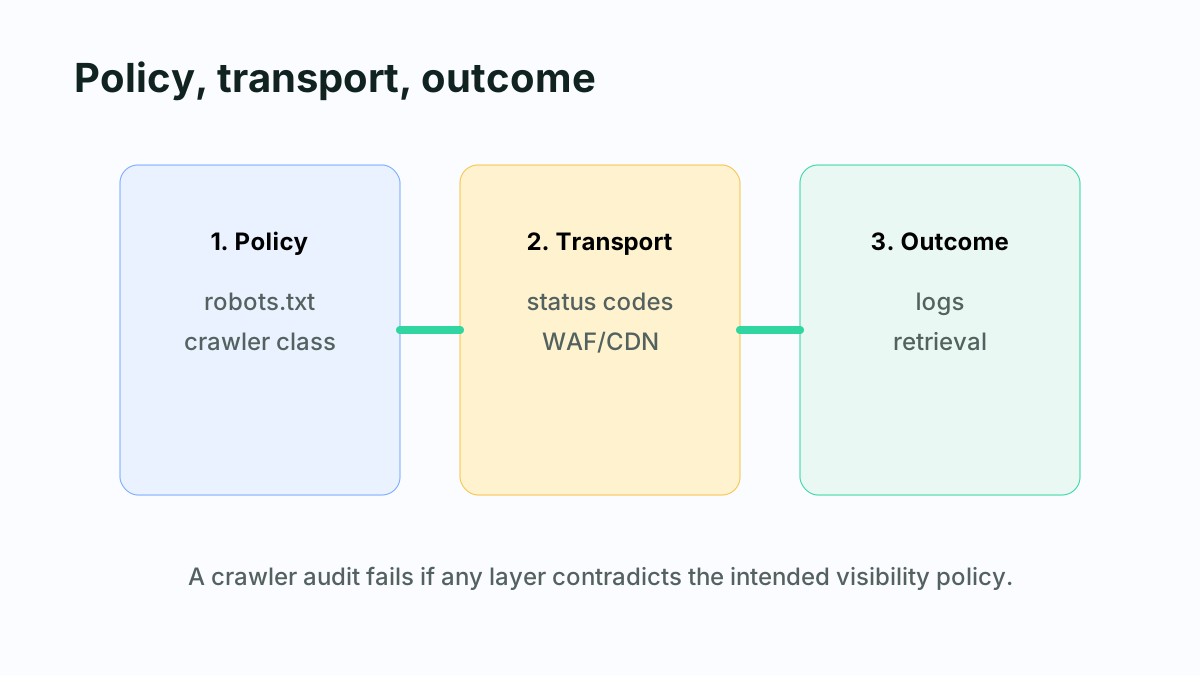
An AI crawler audit should compare intended crawler policy with real retrieval evidence. The audit should show which bots are named, which page classes they can fetch, which edge controls intervene, and whether logs confirm the intended outcome.
The audit goal is to answer five questions. Which AI bots does the site recognize? Which ones are allowed, blocked, or missing? Do public pages return clean 2xx responses? Do security tools challenge or block legitimate traffic? Do logs prove that the policy works after deployment?
The highest-value finding is usually a contradiction. SEO sees an allow rule, security sees a bot block, engineering sees a redirect, and logs show 403. A useful audit forces those systems into one evidence table.
Which AI bots should your audit include?
Start with the bots your scanner or policy actually checks. CanAgentUse currently audits explicit robots.txt user-agent rules for 13 AI and AI-adjacent crawlers: GPTBot, ChatGPT-User, ClaudeBot, Claude-Web, Anthropic-AI, Google-Extended, PerplexityBot, CCBot, Applebot-Extended, Meta-ExternalAgent, Bytespider, Amazonbot, and Cohere-AI.
| Bot or user agent | Typical policy question | Why it matters |
|---|---|---|
| GPTBot | Allow training use? | OpenAI identifies GPTBot separately from search and user actions. |
| OAI-SearchBot | Allow ChatGPT search discovery? | OpenAI says this affects surfacing in ChatGPT search answers. |
| ChatGPT-User | Allow user-triggered fetches? | OpenAI describes this as user-initiated, not automatic crawling. |
| ClaudeBot | Allow Anthropic model-development crawling? | Anthropic separates training, search, and user retrieval. |
| Claude-SearchBot | Allow Claude search indexing? | Blocking it may reduce Claude search visibility. |
| Claude-User | Allow user-directed retrieval? | User retrieval should be treated differently from training. |
| Claude-Web | Legacy or related Anthropic crawler policy? | Some sites still name it explicitly in robots.txt. |
| Anthropic-AI | Anthropic policy coverage? | Explicit naming reduces ambiguity in older policies. |
| Google-Extended | Allow Google model training use? | Google documents it as a control for Gemini/Vertex training use. |
| PerplexityBot | Allow Perplexity discovery? | Perplexity documents bot access and WAF allowlisting guidance. |
| Perplexity-User | Allow user-requested Perplexity fetches? | It belongs in a user-fetch policy class. |
| CCBot | Allow Common Crawl? | Common Crawl data can flow into many AI datasets. |
| Applebot-Extended | Allow Apple AI use preferences? | Apple documents Applebot-Extended for data-use control. |
| Meta-ExternalAgent | Allow Meta external agent access? | Needed for Meta AI-related crawler policies. |
| Bytespider | Allow ByteDance crawler access? | Commonly appears in AI crawler block lists. |
| Amazonbot | Allow Amazon crawler access? | Can appear in AI and assistant crawler policies. |
| Cohere-AI | Allow Cohere AI crawler access? | Relevant for enterprise AI/search ecosystems. |
Bot coverage must be explicit. A robots file that names only GPTBot and ClaudeBot can still leave PerplexityBot, Google-Extended, CCBot, Applebot-Extended, Meta-ExternalAgent, Bytespider, Amazonbot, and Cohere-AI ambiguous.
The table includes more agents than a single scanner rule because crawler ecosystems do not stay neat. A strong audit uses vendor docs as the source of truth, then keeps a local watchlist for bots the business cares about. Missing names are not always failures, but they are policy gaps.
How should you separate bot purpose classes?
Separate bots by purpose before deciding allow or disallow. OpenAI says OAI-SearchBot is for ChatGPT search, GPTBot is for training-related crawling, and ChatGPT-User supports user actions. Anthropic similarly documents robots for model development, search, and user-directed retrieval (Anthropic Help Center, 2026-06-03).
| Purpose class | Examples | Default audit posture |
|---|---|---|
| Search or answer discovery | OAI-SearchBot, Claude-SearchBot, PerplexityBot, Googlebot | Usually allow public content if AI visibility matters. |
| User-directed fetch | ChatGPT-User, Claude-User, Perplexity-User | Usually allow public pages; protect private data with auth. |
| Training or model improvement | GPTBot, ClaudeBot, Google-Extended, CCBot, Applebot-Extended | Decide with legal, content, and business owners. |
| Broad AI-adjacent crawlers | Meta-ExternalAgent, Bytespider, Amazonbot, Cohere-AI | Decide by data policy and log behavior. |
| Unknown or spoofed agents | Fake user agents, unverified IPs | Verify identity or challenge. |
Training, search, and user-fetch bots should not share one blanket rule. A site can block model-training crawlers while allowing AI search and user-directed retrieval, but the policy must name the agents and logs must prove the behavior.
This is where many teams overcorrect. Blocking every AI crawler may protect training preference, but it can also remove your public docs from AI search. Allowing every crawler may help visibility, but it can conflict with content licensing or publisher policy.
What should robots.txt prove?
robots.txt should prove that the site has a parseable crawler policy with User-agent directives, clear Allow or Disallow choices, and sitemap references. RFC 9309 defines robots.txt as the Robots Exclusion Protocol, and Google still documents it as a standard crawl-control file (Google Search Central, 2026-06-03).
Use a policy matrix before writing rules:
| Page class | Search bots | User-fetch bots | Training bots | Notes |
|---|---|---|---|---|
| Homepage and product pages | Allow | Allow | Decide | Needed for AI visibility. |
| Blog and docs | Allow | Allow | Decide | Usually the core citation surface. |
| Pricing and contact | Allow | Allow | Decide | Useful for buyer answers. |
| Reports and dashboards | Block by auth | Block by auth | Block by auth | Do not rely on robots.txt. |
| Admin and account routes | Block by auth | Block by auth | Block by auth | Server authorization is mandatory. |
robots.txtis policy evidence, not privacy enforcement. It should declare crawler intent for public URLs, while private dashboards, reports, invoices, and admin routes must be protected with authentication and server authorization.
CanAgentUse parses robots.txt for user agents, sitemap directives, and Content-Signal entries. It also checks whether major AI bots are named at all. That means a "valid" robots file can still score poorly if it never names AI crawler policy.
For the broader machine-readable content layer, pair this with the AI agent readiness playbook. Crawler access is only one part of the stack.
What else belongs in the crawler-policy layer?
The policy layer should include robots.txt, sitemap links, llms.txt, ai.txt where relevant, TDMRep where relevant, and Content-Signal directives. These files do not all do the same job, but together they reduce ambiguity for crawlers, agents, publishers, and auditors.
| Signal | Scanner question | Practical value |
|---|---|---|
robots.txt | Is there a valid crawl policy? | Names user agents, rules, and sitemaps. |
| AI bot rules | Are major AI crawlers explicit? | Reduces ambiguity around training/search/retrieval. |
| Content-Signal | Are ai-train, search, and ai-input declared? | Gives machine-readable AI usage preference where supported. |
llms.txt | Is there a concise agent-readable site guide? | Helps summarize important public context and links. |
ai.txt | Is there human-readable AI policy text? | Useful for advisory usage, attribution, and contact guidance. |
| TDMRep | Is there a text/data mining reservation signal? | Relevant for rightsholders using W3C TDM reservation policy. |
| Sitemap | Are canonical URLs discoverable? | Gives crawlers updated public URLs. |
AI crawler policy is multi-file.
robots.txtcontrols crawl intent,llms.txtorganizes public context, Content-Signal declares usage preferences,ai.txtcan explain policy, and TDMRep can support text/data mining reservation where applicable.
Do not add every emerging file because a checklist says so. Add the signals that match your business policy, then keep them consistent. The worst outcome is a site that blocks training in robots.txt, invites broad AI use in ai.txt, and lists blocked URLs in llms.txt.
Why can robots.txt pass while retrieval fails?
Robots.txt can pass while retrieval fails because fetches still traverse DNS, redirects, CDN rules, bot scoring, WAF policies, rate limits, geo restrictions, TLS settings, and application routing. Perplexity documents WAF allowlisting considerations for its crawlers (Perplexity Crawlers, 2026-06-03).
Common failure modes:
robots.txtallows the bot, but Cloudflare or another CDN returns a challenge.- The homepage returns
200, but docs routes return403to crawler-like traffic. - A redirect chain drops the bot onto a localized or consent page.
- The server returns
200with a JavaScript shell and no extractable content. - A managed bot rule blocks published crawler IP ranges.
- Rate limits return
429during repeated assistant fetches. noindexorX-Robots-Tagconflicts with organic and AI overview goals.
A crawler audit needs transport evidence. A page is not AI-retrievable just because policy allows it; the audit must confirm status code, final URL, response body, headers, and edge decision for representative public pages.
Personal Experience
When we inspect readiness reports, the sneakiest issue is a "good" 200 response that contains a consent wall, challenge page, or empty app shell. The status code passes. The content fails.
How do you test edge and WAF behavior?
Test edge behavior with representative URLs and crawler classes. You do not need to spoof every bot in production, but you do need evidence from logs, vendor verification, and controlled fetches that the intended crawlers are not receiving challenges.
Use this workflow:
- Fetch
/robots.txt,/sitemap.xml,/llms.txt, and key public pages. - Record status code, content type, final URL, canonical, and body excerpt.
- Compare normal browser fetches with crawler-like fetches where safe.
- Check WAF events for allowed, challenged, blocked, and rate-limited requests.
- Verify official IP ranges for vendors that publish them.
- Confirm the response body contains the expected page content.
- Rescan after security-rule changes, CDN migrations, or framework rewrites.
WAF validation should combine user-agent policy with identity evidence. User-agent strings can be spoofed, so high-confidence allow rules should use official vendor guidance, IP verification where available, and ongoing log review.
Do not blindly allow every request with an AI-looking user agent. That invites spoofing. Also do not blindly block every unknown bot if your public content strategy depends on AI search visibility. Treat crawler identity as a security problem and crawler purpose as a policy problem.
What should your log table show?
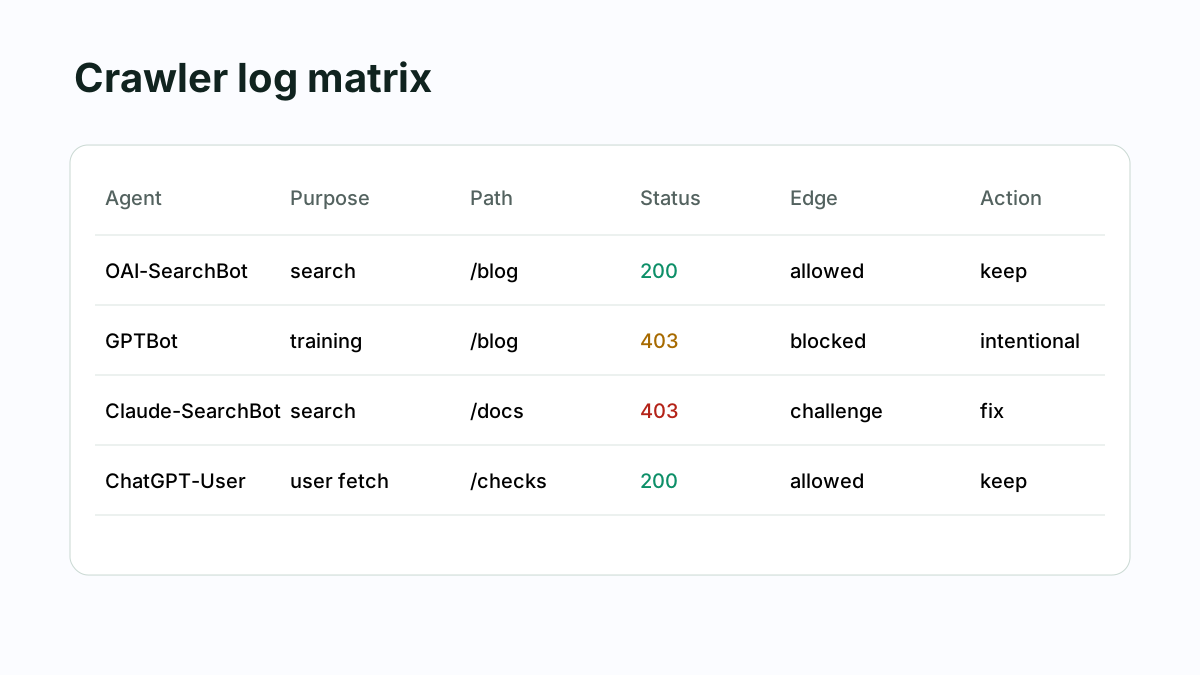
Your log table should show one row per bot, page class, and result. The minimum useful fields are user agent, purpose, URL path, policy decision, status code, final URL, edge action, IP verification, body class, last seen, owner, and next action.
| User agent | Purpose | Path | Policy | Status | Edge action | Body class | Action |
|---|---|---|---|---|---|---|---|
| OAI-SearchBot | Search | /blog/ | Allow | 200 | Allowed | Article HTML | Keep |
| GPTBot | Training | /blog/ | Disallow | 403 | Blocked | Block page | Intentional |
| ChatGPT-User | User fetch | /checks | Allow | 200 | Allowed | Product HTML | Keep |
| Claude-SearchBot | Search | /docs | Allow | 403 | Challenge | Challenge page | Fix WAF |
| PerplexityBot | Search | /pricing | Allow | 429 | Rate limit | Error page | Tune limit |
| Googlebot | Search | /blog/ | Allow | 200 | Allowed | Article HTML | Keep |
A useful AI crawler log table captures both policy and outcome. Status code alone is insufficient; the row should also show edge action, final URL, body class, and whether the result matches the intended crawler purpose.
Which pages should you audit first?
Prioritize pages that teach, prove, or convert. For a SaaS site, audit the homepage, product pages, pricing, docs, API reference, blog hub, top blog posts, changelog, contact routes, and any public report pages. Then audit private routes to confirm they are protected by authentication.
| Priority | Page class | Why it matters |
|---|---|---|
| P0 | Homepage, pricing, product pages | AI systems use them for brand and offer summaries. |
| P0 | Docs and API reference | Assistants use them to answer implementation questions. |
| P1 | Blog hub and strategic posts | These feed GEO, AIO, and topical authority. |
| P1 | openapi.json, API catalog, MCP card | These support agent action discovery. |
| P2 | Changelog and status pages | These support freshness and operational trust. |
| P0 private | Reports, dashboards, admin | These must require authentication. |
Page selection changes crawler-audit quality. Auditing only the homepage misses docs, blog posts, API contracts, and conversion paths; auditing private routes verifies that sensitive content is protected by auth, not by voluntary crawler rules.
This is where crawler audits connect to the OpenAPI to MCP action layer. A crawler may reach your docs, but an agent still cannot act if your API contract, OAuth metadata, and MCP server card are missing.
Once the retrieval layer is clean, the MCP server SEO guide shows how to audit action discovery and protocol evidence.
How should you decide allow, block, or monitor?
Use three decisions: allow, block, or monitor. Allow means the bot is useful and the content is public. Block means the bot conflicts with policy or content rights. Monitor means the bot is not yet important enough to allow broadly, but logs should track behavior.
For many B2B sites, a balanced default is:
- Allow search and user-fetch bots for public marketing, docs, and blog pages.
- Decide training access separately with legal and content owners.
- Block private routes with authentication, not robots.txt.
- Monitor AI-adjacent crawlers that are not tied to clear business value.
- Review WAF events monthly and after every security change.
The best crawler posture is not "allow AI" or "block AI." It is purpose-level access: public retrieval for visibility, explicit training preference, authenticated private content, and logs that reveal when the policy stops matching production behavior.
FAQ
Should I block GPTBot?
Maybe. OpenAI documents GPTBot separately from OAI-SearchBot and ChatGPT-User. Many publishers block training while allowing AI search and user-fetch. The key is to name the specific bot and verify the result in logs.
Is ChatGPT-User different from GPTBot?
Yes. OpenAI documents ChatGPT-User for certain user actions, while GPTBot relates to foundation-model training. A crawler audit should treat them as different policy classes and avoid one blanket rule.
Why does CanAgentUse check bots like CCBot and Applebot-Extended?
Because AI visibility and training exposure extend beyond the most famous assistant brands. Common Crawl, Apple, Meta, ByteDance, Amazon, and Cohere-related crawlers may matter for publisher policy, AI datasets, or assistant ecosystems.
Does Cloudflare block AI crawlers?
It can, depending on bot-management, WAF, challenge, and rate-limit settings. The audit should inspect edge events and verify official crawler identity guidance where available.
How often should crawler access be audited?
Audit monthly, plus after CDN, WAF, bot-management, robots.txt, CMS, framework, or routing changes. Crawler docs and security defaults change too quickly for one-time setup.
Research sources
- OpenAI, Overview of OpenAI Crawlers, 2026-06-03.
- Anthropic Help Center, Does Anthropic crawl data from the web?, 2026-06-03.
- Perplexity, Perplexity Crawlers, 2026-06-03.
- Google Search Central, Robots.txt introduction, 2026-06-03.
- RFC 9309, Robots Exclusion Protocol, 2026-06-03.
- Content Signals, Content Signal specification, 2026-06-03.
- W3C Community Group, TDM Reservation Protocol, 2026-06-03.
Share