
AI bot traffic taxonomy guide for websites
AI bot traffic taxonomy guide: 8 classes, route risk, signed agents, verification, logs, and policy for crawlers and user agents.
Share
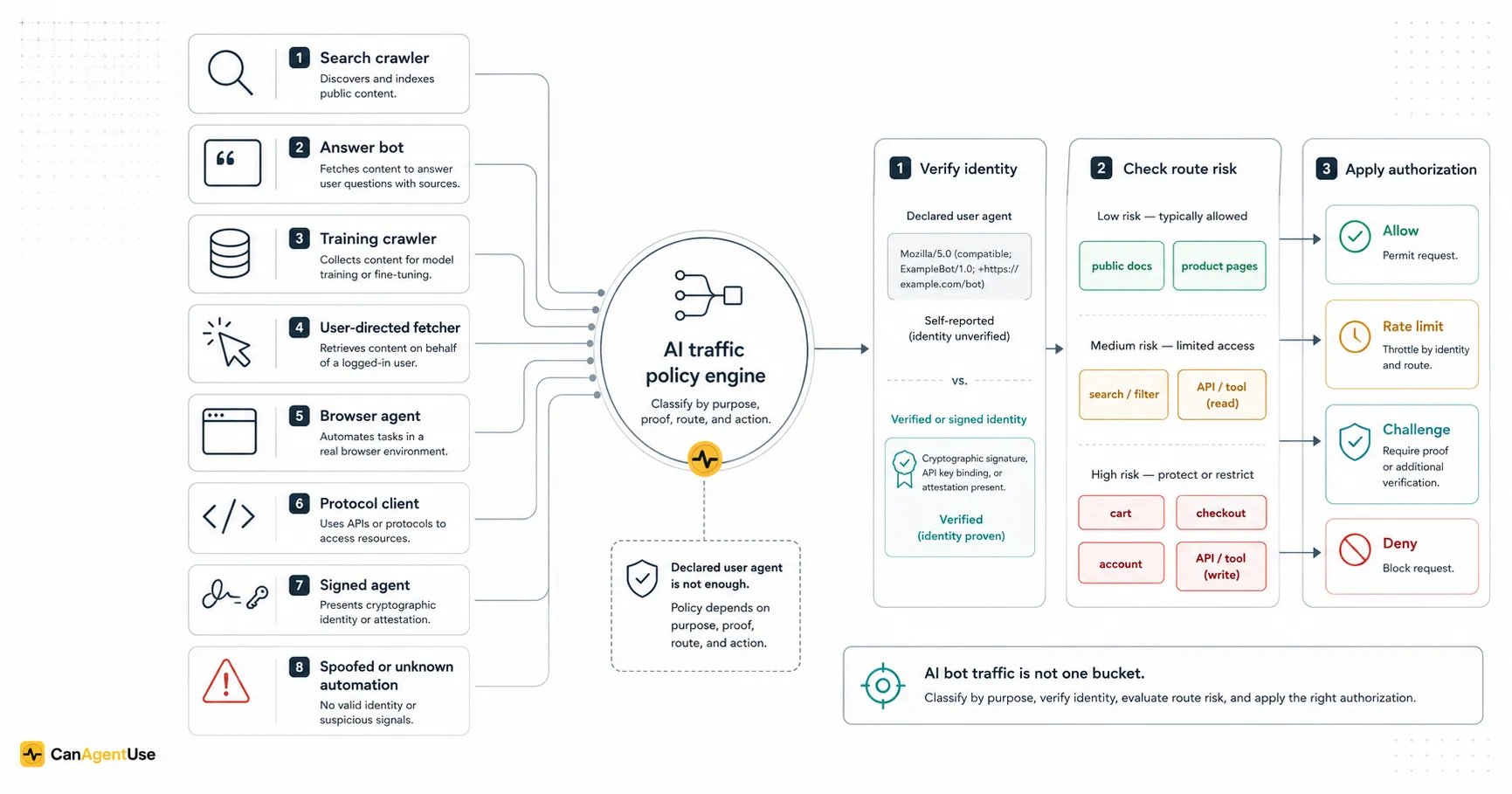
"AI bot traffic" is too broad to operate on.
A request from an AI system might be indexing a page for search, retrieving a source for an answer, collecting public content for model training, fetching a URL because a user asked, operating a browser as a user's assistant, calling an MCP tool, or spoofing a familiar user agent to scrape an expensive route.
Those are not the same thing. They should not share one allow/block switch.
OpenAI documents multiple crawler and user agent roles, including GPTBot, OAI-SearchBot, ChatGPT-User, and ChatGPT-Search (OpenAI crawler docs, 2026-06-29). Google separates Googlebot, special-case crawlers, and user-triggered fetchers in its crawler overview (Google Search Central crawler overview, 2026-06-29). Perplexity publishes separate user agents for its crawler behavior (Perplexity crawler docs, 2026-06-29). The ecosystem is already telling us that purpose matters.
TL;DR AI bot traffic should be classified by purpose, identity proof, route risk, and permission. The useful classes are search crawlers, answer/retrieval bots, training crawlers, user-directed fetchers, browser agents, protocol clients, signed agents, and spoofed or unknown automation. A crawl policy file expresses preference. Verification proves identity. Authorization decides what the request may do.
AI bot traffic taxonomy is a model for naming automated AI-related requests before applying policy. Declared identity is what the request says it is through headers or metadata. Verified identity is evidence that the request came from the claimed actor. Route risk is the sensitivity and cost of the URL being accessed. Authorization is the permission decision for the action.
The mistake we see most often is treating "AI" as one risk class. That creates two bad outcomes. Some teams block useful retrieval and make their public docs harder for assistants to cite. Others allow too much and expose search, checkout, account, or expensive dynamic pages to automation they never intended to support.
We tested this taxonomy against access-log exports, crawl policy files, and route inventories. From our analysis, the useful break was never "AI versus not AI." It was purpose, proof, route risk, and permission. In our experience, teams make better decisions when every request has a class and every policy decision has a reason.
This article is a technical taxonomy for website teams. It connects crawler policy, edge verification, WAF decisions, logs, route classification, user-directed agents, and signed-agent work such as Cloudflare's Web Bot Auth proposal.
Reviewed under the CanAgentUse editorial process; see our about and contact pages for context.
Why does the old bot model break?
The old bot model was mostly search crawler versus scraper. That was already imperfect, but teams had a working habit: verify Googlebot, allow public pages, block private routes, rate limit suspicious automation, and watch logs.
AI traffic breaks that model because the same provider may send different traffic for different purposes.
| Old question | New question |
|---|---|
| Is this Googlebot? | Which Google crawler or fetcher is it, and why is it here? |
| Is this a search crawler? | Is it indexing, answering, training, fetching for a user, or acting? |
| Should bots reach this page? | Should this class reach this route for this purpose? |
| Is the user agent allowed? | Is the identity verified, and is the action authorized? |
| Did the request return 200? | Did the policy decision match the route risk and crawler purpose? |
Google's crawler overview explicitly says its crawlers and fetchers fall into categories, and some are triggered by user actions rather than general search indexing (Google Search Central, 2026-06-29). OpenAI's docs also separate crawler roles. That distinction matters operationally because a public documentation page, a pricing page, a cart endpoint, and an account page have different policy boundaries.
AI bot policy fails when teams classify traffic only by brand name. OpenAI, Google, and Perplexity all document multiple crawler or fetcher roles, which means website teams need purpose-level classification. A verified provider identity is useful, but the route and action still decide whether the request should be allowed.
The operational model should have four layers:
- Purpose: what kind of automated request is this?
- Proof: how confident are we about who sent it?
- Route risk: what page or endpoint is being accessed?
- Permission: should this request be allowed, limited, challenged, authenticated, or denied?
Skipping any layer creates weird policy. A training crawler may be allowed on a blog but not a customer forum. A user-directed fetcher may be allowed to read a public guide but not submit a form. A signed browser agent may still need user authorization before checkout.
What are the eight useful AI traffic classes?
The taxonomy below is a working model, not a legal ontology. It is meant to drive edge rules, logs, dashboards, crawl policy, and product decisions.
| Class | Purpose | Typical identity signal | Main policy question |
|---|---|---|---|
| Search crawler | Discover and index public pages for search | Published user agent plus verification | Should this URL appear in search? |
| Answer/retrieval bot | Fetch sources for AI answers or citations | Published user agent, IP verification, provider docs | Should this page ground generated answers? |
| Training crawler | Collect public content for model training | Published user agent or crawler class | Do we allow training use of this content? |
| User-directed fetcher | Retrieve a URL because a user asked an assistant | User-facing agent string or product-specific fetcher | Should a user's assistant be able to read this page? |
| Browser agent | Operate the site through a browser | Browser-like traffic, session behavior, signed identity if available | Which tasks are safe through the UI? |
| Protocol client | Call APIs, MCP tools, UCP, A2A, or agent endpoints | OAuth, API keys, mTLS, signed requests, tool client metadata | What scopes and schemas apply? |
| Signed agent | Present cryptographic proof of identity or delegation | Signature, issuer, key, attestation, token | What can this verified agent do for this user? |
| Spoofed or unknown automation | Claim identity without proof or hide intent | Suspicious user agent, failed verification, behavior signals | Should we challenge, rate limit, tarpit, or block? |
The classes overlap. A provider can run a search crawler and a training crawler. A browser agent may call APIs. A protocol client may fetch public docs first. A signed agent may still be unknown to your application.
That is fine. The point is not to force every request into one forever bucket. The point is to give your policy engine a useful first label.
How should teams separate purpose from identity?
Purpose and identity are different questions.
Purpose asks: why is this request being made?
Identity asks: who made it?
Permission asks: what is it allowed to do here?
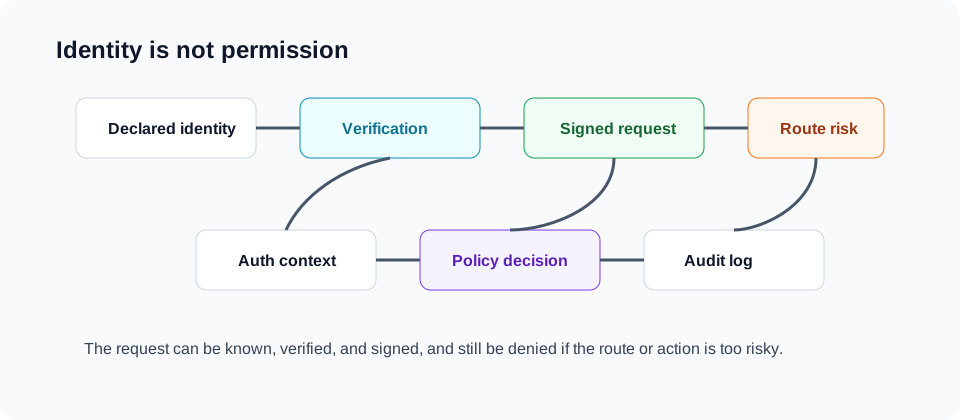
A request can have a declared identity and still lack verified identity. It can have verified identity and still lack permission. It can be a known crawler and still hit the wrong route.
| Scenario | Identity | Permission result |
|---|---|---|
| Verified search crawler on public blog | Strong enough | Allow if page is indexable |
| Verified search crawler on checkout | Strong enough | Block or require auth because route is wrong |
| User-directed fetcher on public docs | Provider may be verified | Usually allow if docs are public |
| User-directed fetcher on account invoice | Provider may be verified | Require user auth and authorization |
| Training crawler on public blog | Provider may be verified | Allow only if training policy permits |
| Unknown bot on expensive search route | Weak | Rate limit or challenge |
| Signed agent calling checkout API | Stronger | Require user mandate and scoped permission |
This layered thinking prevents a common mistake: "We verified it, so it is allowed." Verification is not authorization. It only improves confidence about the actor.
Cloudflare's verified bots documentation frames verified bots as bots that Cloudflare has validated as legitimate for purposes such as search engine crawlers and monitoring services (Cloudflare verified bots, 2026-06-29). That helps with identity. It does not decide whether a verified actor should access /checkout/complete.
What is the difference between search, answer, and training traffic?
Search, answer, and training traffic are often discussed together because they can all fetch public pages. The business question behind each one is different.
Search crawlers
Search crawlers support discovery in search results. Most sites want these crawlers to access canonical public pages, while excluding private, duplicate, or low-value routes.
Good default:
| Route | Search crawler policy |
|---|---|
| Homepage, core landing pages | Allow |
| Blog, docs, help center | Allow if current and canonical |
| Product and category pages | Allow if intended to rank |
| Internal search results | Usually limit or block |
| Faceted duplicates | Control with canonicals, route rules, or parameters |
| Cart, checkout, account | Block or require auth |
| Staging and previews | Block and protect |
Answer and retrieval bots
Answer or retrieval bots fetch pages to support generated answers, citations, search-grounded responses, or assistant summaries. A page can be good for search but bad for answers if it is stale, contradictory, or missing direct definitions.
Answer readiness depends on:
| Signal | Why it matters |
|---|---|
| Canonical page | Avoids conflicting generated answers |
| Updated date | Helps freshness-sensitive systems |
| Direct definitions | Lets assistants quote cleanly |
| Source links | Builds trust and auditability |
| Structured sections | Makes extraction easier |
| Stable policy pages | Prevents old terms from being cited |
If your old refund page is still public and internally linked, an answer bot may retrieve it. That is not the bot's fault. It is a content governance failure.
Training crawlers
Training crawlers collect content for model development or training corpora. That is a different decision than answer retrieval. A company may want its current docs cited in answers but not used as training input. Another company may allow public blog training but exclude user-generated forums or license-restricted material.
Policy should therefore separate:
| Policy dimension | Example decision |
|---|---|
| Search indexing | Allow canonical docs and product pages |
| Answer retrieval | Allow current docs, pricing, and support pages |
| Training use | Exclude docs, allow blog, or decide by license |
| User-directed read | Allow public pages when requested by a user |
| Action execution | Require auth, scopes, and user approval |
Search, answer, and training traffic should not share one rule. Search crawlers support indexing. Answer bots fetch source material for assistant responses. Training crawlers collect content for model development. A business may allow one and refuse another, so route rules, policy files, and logs should preserve the purpose distinction.
This is where legal, SEO, security, and support teams need the same vocabulary. Otherwise, "allow AI bots" means one thing to growth and another to counsel.
What makes user-directed fetchers different?
User-directed fetchers are automated requests caused by a user's intent. A user pastes a URL into an assistant and asks it to summarize, compare, translate, explain, or evaluate. The fetch is automated, but it is closer to assisted browsing than bulk crawling.
OpenAI documents user-facing agents separately from crawlers, including ChatGPT-User for user actions (OpenAI crawler docs, 2026-06-29). Google also describes fetchers that may be triggered by user actions, separate from broad crawler behavior (Google Search Central, 2026-06-29).
That category is awkward because old bot controls were built for site-owner intent, not user intent.
| User task | Suggested treatment |
|---|---|
| Summarize a public blog post | Allow if public content policy allows retrieval |
| Compare two public product pages | Allow, with rate limits if needed |
| Read public support docs | Allow current canonical docs |
| Summarize a paywalled article | Enforce paywall and session access |
| Read an account invoice | Require user authentication |
| Fill a support form | Require CSRF, session controls, and explicit submit boundary |
| Prepare checkout | Allow cart preparation where appropriate |
| Complete purchase | Require user approval and payment authorization |
The wrong move is blanket blocking every user-directed fetcher because it contains "AI" in the identity. That can make your public documentation harder for customers to use with their own tools. The other wrong move is treating user intent as universal permission. A user's assistant should not bypass auth, paywalls, consent, or fraud controls.
How do browser agents change bot policy?
Browser agents are not classic crawlers. They click, type, scroll, wait, retry, open modals, fill forms, and sometimes carry a user's authenticated session.
That means bot policy moves from "can this actor read the page?" to "can this actor perform this task?"
| Browser-agent action | Risk | Control |
|---|---|---|
| Read public article | Low | Allow public access |
| Filter product catalog | Medium if expensive | Rate limit, cache, expose state |
| Add item to cart | Medium | Session controls, duplicate guards |
| Submit lead form | Medium to high | CSRF, spam controls, confirmation |
| Change account setting | High | Auth, reauth for sensitive fields |
| Cancel subscription | High | Explicit confirmation and audit log |
| Complete checkout | High | User mandate, payment controls, fraud checks |
| Download bulk data | High | Auth, scopes, quotas, abuse detection |
This is where UX and security meet. If a browser agent cannot tell whether "Continue" means "next step" or "charge the card," security risk increases. If the site cannot distinguish a product-filtering task from a checkout-completion task, edge policy becomes too coarse.
Browser agents also make bot detection harder. A legitimate agent might look like a normal browser, because it is using one. A hostile scraper might also use a browser. Behavior signals help, but they are not enough for high-trust actions. For those, identity and authorization need to move into signed delegation, user approval, OAuth-like scopes, or payment mandates.
Security research on autonomous LLM agents points to the same conclusion from another angle: once agents can plan, call tools, and execute multi-step tasks, identity alone is not enough. Systems need scoped authority, runtime checks, audit trails, and recovery paths for tool misuse or prompt-driven redirection (Mao et al., "SoK, Security of Autonomous LLM Agents in Agentic Commerce", 2026-06-29).
Browser agents turn bot policy from page access into task authorization. Reading a public article, filtering products, submitting a form, changing account settings, and completing checkout have different risk profiles. A browser-like request is not automatically human or hostile, so high-risk actions need auth, user approval, audit logs, and duplicate guards.
How are protocol clients different from browser agents?
Protocol clients call structured machine interfaces: REST APIs, GraphQL, MCP tools, A2A endpoints, UCP commerce profiles, or internal agent APIs. They can be safer than browser automation because the action and schema are explicit. They can also be more dangerous because they bypass the friction and visibility of the UI.
| Client path | Strength | Risk |
|---|---|---|
| Browser agent | Works on today's web, uses existing auth | Ambiguous UI state, fragile interaction, hard identity |
| REST or GraphQL API | Mature auth and rate limits | Overbroad endpoints, hidden business controls |
| MCP tool | Agent-friendly action schema | Tool may be too powerful or underspecified |
| A2A endpoint | Agent-to-agent task exchange | Delegation and lifecycle complexity |
| UCP commerce path | Shared commerce objects and payment handlers | Requires strict cart, mandate, and payment controls |
| Signed-agent channel | Stronger identity proof | Still needs route policy and user authorization |
The policy rule is simple: a protocol client should not get a weaker business control than the browser route.
If the UI requires reauthentication before changing payout details, the API should too. If the browser checkout requires final review, the UCP or API checkout path needs an equivalent mandate. If the support portal rate limits exports, the MCP tool should not allow unlimited export just because the schema is neat.
What does signed-agent identity add?
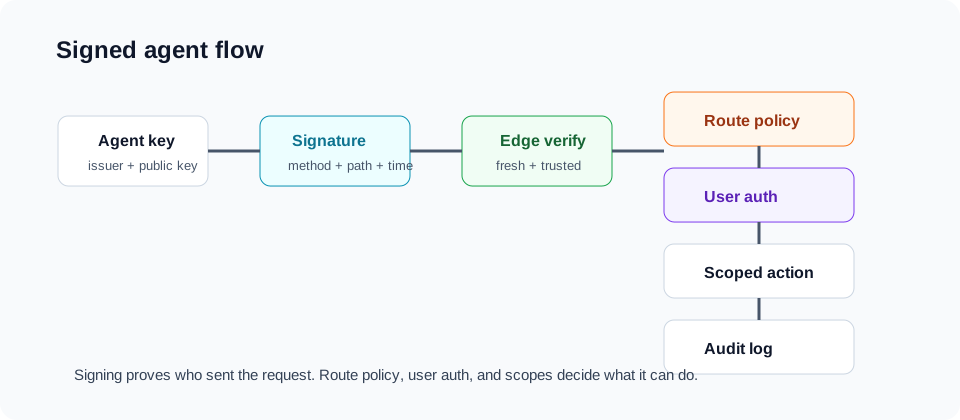
Signed-agent work tries to solve the gap between declared identity and trusted identity. Instead of relying only on an IP list or user-agent string, an agent can present a cryptographic proof that the request came from a known actor or delegated user.
Cloudflare's Web Bot Auth proposal describes a way for bots to sign requests using public key cryptography, allowing websites to verify bot identity more reliably than user-agent strings alone (Cloudflare Web Bot Auth, 2026-06-29). The direction is important: bots need something closer to authentication.
Signed identity helps answer:
| Question | Signed identity contribution |
|---|---|
| Did this request come from the claimed agent? | Signature verification |
| Is the key controlled by a known issuer? | Public key registry or trust anchor |
| Was this request modified in transit? | Request binding |
| Is the signature fresh? | Timestamp and nonce |
| Is this agent acting for a user? | Delegation token or user consent record |
Signed identity does not answer:
| Question | Missing layer |
|---|---|
| Is this route public? | Route policy |
| Can this user access this account? | Authentication and authorization |
| Can this agent perform this action? | Scopes and consent |
| Is this payment approved? | Payment mandate or wallet authorization |
| Is this request abusive at scale? | Rate limits and abuse controls |
Think of signed agents as a stronger identity layer, not a magic allowlist. The phrase "verified agent" should never mean "allowed everywhere."
How should route risk drive policy?
Route risk is the part many teams skip. They write bot rules by actor and forget that URLs differ wildly in sensitivity, cost, and action power.
Start with route classes:
| Route class | Examples | Default AI traffic policy |
|---|---|---|
| Public content | Blog, docs, guides, homepage | Allow search and answer retrieval; decide training separately |
| Canonical commercial pages | Pricing, products, plans | Allow search, answer, and user-directed read |
| Dynamic discovery | Internal search, filters, recommendations | Allow carefully with caching and rate limits |
| Expensive public tools | Calculators, validators, previews | Rate limit, cache, require API key if abused |
| Forms | Lead, contact, support, newsletter | Require CSRF, spam controls, confirmation |
| Cart | Cart read and edit | Session controls, duplicate guards, rate limits |
| Checkout and payment | Shipping, taxes, payment, order completion | Require auth, user approval, fraud controls |
| Account | Profile, billing, invoices, settings | Require auth and step-up for sensitive actions |
| Admin and internal | CMS, dashboards, preview, debug | Deny public automation |
| APIs and MCP tools | Machine endpoints | Require auth, scopes, schema validation, audit logs |
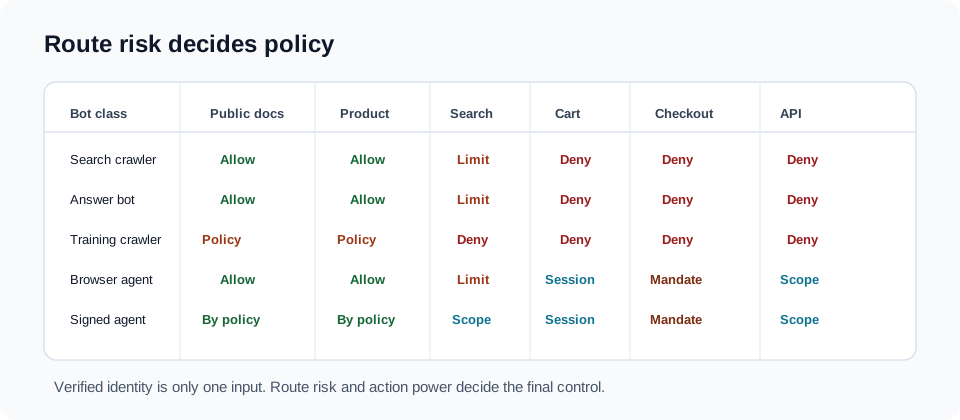
Then combine route risk with bot class:
| Bot class | Public docs | Product pages | Search/filter | Cart | Checkout | Account | API/tool |
|---|---|---|---|---|---|---|---|
| Search crawler | Allow if canonical | Allow if indexable | Limit | Deny | Deny | Deny | Deny |
| Answer/retrieval | Allow current docs | Allow current pages | Limit | Deny | Deny | Deny | Deny |
| Training crawler | Policy-specific | Policy-specific | Usually deny | Deny | Deny | Deny | Deny |
| User-directed fetcher | Allow public | Allow public | Limit | Auth/session | Auth plus approval | Auth | Scope |
| Browser agent | Allow public | Allow public | Limit | Session controls | User mandate | Auth plus step-up | Scope |
| Protocol client | N/A or allow docs | N/A | Scope | Scope | Scope plus mandate | Scope | Scope |
| Signed agent | Allow by policy | Allow by policy | Rate and scope | Session or scope | User mandate | Auth plus scope | Scope |
| Unknown automation | Observe or limit | Limit | Rate limit | Challenge | Deny | Deny | Deny |
This matrix turns the vague debate into engineering work. You can implement it at the CDN, WAF, app middleware, API gateway, and product layer.
What should verification actually check?
Verification methods vary by provider and infrastructure. Treat them as signals with different strengths.
| Verification method | Strength | Weakness |
|---|---|---|
| User-agent match | Easy first signal | Trivial to spoof |
| Published IP range | Stronger for known providers | Operational maintenance, cloud churn |
| Reverse DNS plus forward DNS | Common for major crawlers | Provider-specific and not universal |
| CDN verified bot flag | Easy at edge | Depends on CDN vendor classification |
| Signed request | Strong identity proof | Ecosystem still emerging |
| OAuth or API key | Strong for protocol clients | Not suited to public crawlers |
| Session authentication | User-specific access | Does not identify the agent cleanly |
| Behavior model | Catches abuse patterns | Can confuse legitimate agents and attackers |
For major search crawlers, reverse DNS verification remains a common technique. For newer AI traffic, provider docs and CDN bot products may be more practical. For high-risk actions, move beyond crawler verification and require user auth, scopes, and explicit approval.
Verification should produce a normalized value:
JSON{
"declared_identity": "GPTBot",
"normalized_actor": "openai",
"traffic_class": "training_crawler",
"verification_method": "published_provider_rule",
"verification_status": "verified",
"confidence": "high"
}
Then route policy decides what happens next.
What should logs capture?
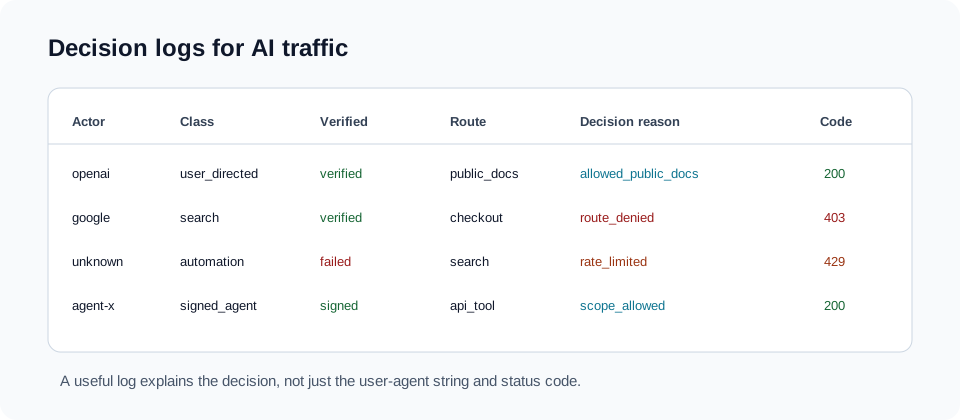
If logs keep only raw user-agent strings, you cannot debug AI traffic. You need the classification and the decision reason.
Log at least:
| Field | Example |
|---|---|
| Request ID | req_01h... |
| Timestamp | 2026-06-29T10:31:54Z |
| Method and path | GET /docs/agent-card-discovery |
| Declared user agent | Raw header |
| Normalized actor | openai, google, perplexity, anthropic, unknown |
| Traffic class | search, answer, training, user_directed, browser_agent, protocol_client, signed_agent, unknown |
| Verification status | verified, signed, reverse_dns_passed, unverified, failed |
| Route class | public_docs, product_page, search, cart, checkout, account, api |
| Auth context | anonymous, user_session, service_token, delegated_user |
| Policy decision | allow, deny, challenge, rate_limit, require_auth |
| Decision reason | answer_bot_allowed_public_docs |
| Status code | 200, 403, 429 |
| Cache status | hit, miss, bypass |
| Cost marker | cheap, dynamic, expensive, write_action |
| User impact | none, assisted_read, attempted_action |
The decision_reason field is the difference between useful logs and archaeology.
Example log record:
JSON{
"request_id": "req_7az4",
"method": "GET",
"path": "/guides/returns-policy",
"declared_user_agent": "ChatGPT-User",
"normalized_actor": "openai",
"traffic_class": "user_directed_fetcher",
"verification_status": "verified",
"route_class": "public_docs",
"auth_context": "anonymous",
"policy_decision": "allow",
"decision_reason": "user_directed_public_docs_allowed",
"status_code": 200,
"cache_status": "hit"
}
AI bot logs should record declared identity, normalized actor, traffic class, verification status, route class, auth context, policy decision, decision reason, status code, and cache status. Cloudflare's Web Bot Auth points toward stronger identity proof, but logs still need route and permission context to explain why a request was allowed or denied.
Logs should not collect sensitive user data just because an agent is involved. Record classification and decisions, not private form values.
What are bad AI bot policies?
Bad policies usually sound simple.
Bad policy 1: block all AI
This blocks useful user-directed retrieval, answer citation, and public documentation access. It may be defensible for a narrow site with sensitive content, but many businesses will harm support, discovery, and customer workflows if they apply it globally.
Better: block or limit specific classes on specific route types.
Bad policy 2: allow all verified bots
Verification proves identity, not permission. A verified crawler should not access checkout, account, staging, debug, or write endpoints.
Better: combine verified identity with route policy.
Bad policy 3: treat public as training-approved
Public access does not automatically settle training use. This is a business, legal, and licensing decision.
Better: separate search, answer retrieval, and training in policy language.
Bad policy 4: user-agent string as the source of truth
User-agent strings are declarations. Unknown automation can spoof them.
Better: use user agent only as an input into verification and classification.
Bad policy 5: no reason in logs
Without a reason field, teams cannot tell whether a request was denied because of route risk, failed verification, missing auth, rate limit, or a broken rule.
Better: log normalized class, route class, decision, and reason.
How should crawl policy, terms, and technical enforcement line up?
Policy signals should agree across layers. If your public terms say training is not allowed, your crawl policy and edge rules should not imply the opposite. If your docs are meant to appear in AI answers, do not hide canonical pages while leaving stale PDFs open.
Use a three-layer model:
| Layer | Role |
|---|---|
| Published preference | Crawl policy file, terms, AI access policy, license notices |
| Technical verification | Provider docs, IP/rDNS checks, CDN verified bot, signed request |
| Enforcement | Edge rules, auth, rate limits, route policy, API scopes |
The published preference helps cooperative actors. Technical verification improves identity confidence. Enforcement protects routes when cooperation or identity is not enough.
Do not make a crawl policy file carry more weight than it can. It is not authentication. It is not authorization. It is one input into a larger system.
How does caching affect AI bot traffic?
AI retrieval can make stale-content problems worse. If a docs page is cached for a long time after a policy change, an answer bot may fetch an old version and cite it. If an expensive route is not cached at all, harmless retrieval can become a cost problem.
Cache policy should vary by route:
| Route | Cache approach |
|---|---|
| Blog and docs | Cache strongly, purge on update |
| Pricing | Cache carefully, purge on change |
| Product pages | Cache public shell, update availability carefully |
| Search results | Cache popular queries, rate limit high-cardinality filters |
| Cart and checkout | Do not public-cache user state |
| Account | Private cache only, auth required |
| API tools | Use quotas and explicit freshness rules |
For AI answer readiness, freshness is a policy problem as much as a content problem. A stale page with good structure is still a stale source.
What is the implementation plan?
Start with observation. Then add policy. Then enforce.
Phase 1: classify and log
- Inventory routes and assign route classes.
- Normalize known crawler user agents into traffic classes.
- Add verification status where possible.
- Add policy decision and reason fields to logs.
- Build a dashboard by actor, class, route, decision, and status code.
Phase 2: publish policy
- Decide search, answer, training, and user-directed retrieval preferences.
- Align crawl policy files, terms, and public AI access pages.
- Remove stale public pages that should not ground answers.
- Make canonical public docs clear and current.
Phase 3: enforce route rules
- Allow search and answer retrieval on public canonical pages.
- Separate training rules from answer rules.
- Rate limit dynamic discovery routes.
- Require auth for account, checkout, and protected APIs.
- Require scoped tokens or signed requests for agent endpoints.
- Add user approval and idempotency for high-risk actions.
Phase 4: test with real scenarios
Test these cases:
| Scenario | Expected result |
|---|---|
| Search crawler fetches canonical guide | 200 allowed |
| Answer bot fetches stale policy URL | 301 to canonical or 410 |
| Training crawler fetches excluded docs | Denied or policy-specific response |
| User-directed fetcher reads public support page | 200 allowed |
| Browser agent filters product catalog quickly | Allowed with rate limits and cache |
| Browser agent submits lead form repeatedly | Spam control or rate limit |
| Signed agent starts checkout | Allowed only with session and user mandate |
| Unknown bot hits account route | Deny or require auth |
This is not a one-time checklist. AI traffic categories will change. Keep the taxonomy in code and logs, not just in a slide deck.
FAQ
What is AI bot traffic taxonomy?
AI bot traffic taxonomy is a classification model for automated AI-related requests. It separates search crawlers, answer bots, training crawlers, user-directed fetchers, browser agents, protocol clients, signed agents, and unknown automation so teams can apply route-specific policy instead of one broad allow/block rule.
Is a crawl policy file enough for AI bot control?
No. A crawl policy file expresses preferences to cooperative crawlers, but it does not prove identity or authorize actions. Website teams still need verification, route-level policy, authentication for protected areas, rate limits, and logs that explain each allow or deny decision.
Should answer bots and training crawlers get the same access?
Not necessarily. Many sites want current public docs, pricing, and support pages to appear in AI answers, while applying different rules to model training. Separate search, answer retrieval, and training in policy language, technical rules, and logs.
What is the difference between a browser agent and a crawler?
A crawler usually reads pages for indexing, retrieval, or training. A browser agent operates the site through the UI: clicking buttons, filling forms, opening modals, adding items to carts, or completing tasks. Browser agents need task authorization, not just page access policy.
What does signed-agent identity solve?
Signed-agent identity helps prove that a request came from the claimed agent or issuer. It is stronger than trusting a user-agent string. It does not decide whether the route is public, whether the user is authorized, whether the action is safe, or whether a payment is approved.
Conclusion
AI bot traffic needs taxonomy before policy.
Search crawlers, answer bots, training crawlers, user-directed fetchers, browser agents, protocol clients, signed agents, and unknown automation all touch the web differently. Some read. Some retrieve for a user. Some collect for training. Some act.
The practical model is purpose, proof, route risk, and permission. A user-agent string declares identity. Verification improves confidence. Signed requests can improve it further. None of those replace authorization.
Treat "AI bot" as the beginning of the investigation, not the answer.
Sources
- OpenAI: Overview of OpenAI crawlers, 2026-06-29.
- Google Search Central: Google crawler overview, 2026-06-29.
- Perplexity: Perplexity crawlers, 2026-06-29.
- Cloudflare Blog: Web Bot Auth, 2026-06-29.
- Cloudflare Docs: Verified bots, 2026-06-29.
- Mao et al.: SoK, Security of Autonomous LLM Agents in Agentic Commerce, 2026-06-29.
- Model Context Protocol tools specification, 2026-06-29.
- Google Developers Blog: A2A, a new era of agent interoperability, 2026-06-29.
- Google Developers Blog: Under the Hood, Universal Commerce Protocol, 2026-06-29.
- CanAgentUse AI crawler access guide, signed agent access guide, and AI crawler audit guide.
Share